


2026-09-18 10:00:18
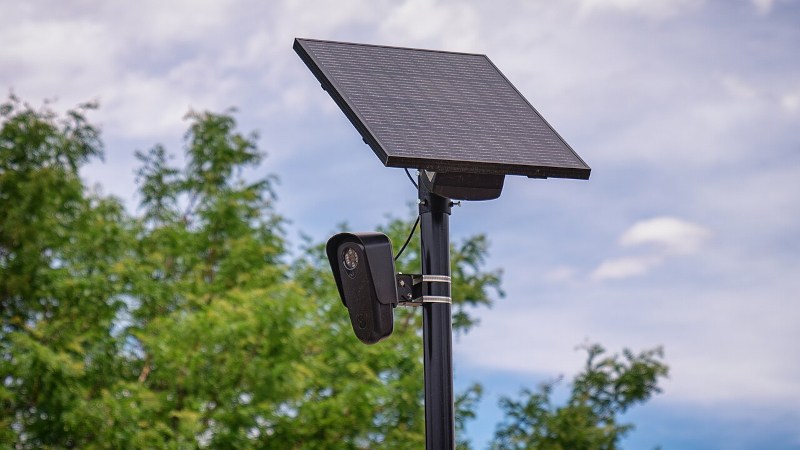
Surveillance cameras from Flock Safety have become a controversial privacy battleground, as the communities in which they are installed wake up to their sinister potential, and stories roll in of law enforcement professionals abusing their access. One has had its disk contents dumped, and we’ve been treated to some insights courtesy of [Micah Lee]. In short: their approach to security is deeply flawed.
It’s interesting to find that instead of a custom hardened OS, these devices run Android. Not just Android, but Android 8.1, a long out of support version originally released in 2017. This is is the year Flock Safety was founded, which may or may not be coincidental. Like any old version of a widely used operating system it has a host of known vulnerabilities, none of which are patched on this version.
The Android version is small beer compared to the revelation that they contain a hard-coded and very open-access API key that can be used by any mildly curious miscreant to reveal information from any Flock camera using its MAC address. One would hope that a product marketed for use by law enforcement might have paid attention to such a basic lapse, but it seems not. Whether or not this can be corrected by a software upgrade and the leaked key deactivated without turning off the network depends on whether thy can do upgrades tailored to specific devices, but either way we wouldn’t like to be the team tasked with fixing that one.
In a way it’s reassuring that the surveillance apparatus when it came was so incompetently managed, and we hope that these vulnerabilities will have moderated its effect. We’re sure more tasty discoveries will emerge as investigations proceed, and we’ve got the popcorn ready.
Image: Tony Webster, CC BY 2.0.
2026-09-18 07:00:55

The Cheap Yellow Display is an all-in-one ESP32 board with a touchscreen, that’s as the name suggests, cheap. It’s appeared in a great many projects since it emerged from the depths of AliExpress, and today thanks to [Nickm324] it takes the turn of becoming a mini TV.
The tiny TV project world is one of successive developers building on previous works to deliver their own refinements on the idea, so this one borrows heavily from an earlier ESP32 project. Its twist on the idea is a single button interface using the CYD’s BOOT button. It supports a range of “channels” of which each one is a different piece of media played from the SD card. As far as we can see it’s only able to play synchronised .mjpeg and audio files, probably a shortcoming of the older ESP32 found on the CYD. The photo features a rather cutesy retro 3D printed TV case which annoyingly isn’t linked from the repository at the time of writing.
It’s a nice idea, and the CYD makes it as easy as possible with minimal wiring. Yes it’s a novelty, but we’re guessing there could be many non-novelty applications for it too. It’s certainly not the first such project we’ve seen, here’s an earlier one.
2026-09-18 04:00:04
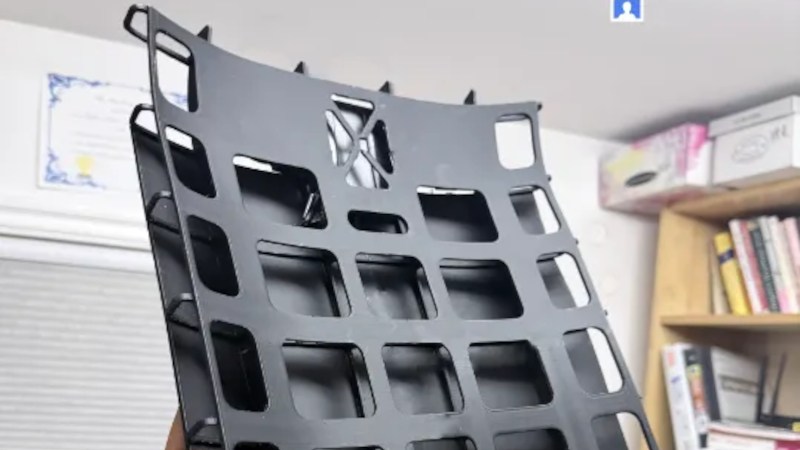
With an El Niño event in full swing those of us in the northern hemisphere have just had a roasting hot summer, and those in the southern are about to have one. We know what that means, even with the best laid plans the slightest bit of exercise is going to raise a lot of sweat. And if you’re carrying a backpack that means a soaking down your back. Never fear though, because for that one, [Crafterboi] is here with a fan-assisted back protector.
The idea is simple enough, an open framework that sits between you and the backpack, allowing air to flow. If that weren’t enough, there are a couple of 5 volt fans at the top to blow air through the space. It’s printed using PETG, because as he explains, on a really hot day some surfaces can exceed the temperature at which PLA starts to soften.
We like the idea of this project, but what we especially like is that his prototype was made of a pizza box. ten out of ten for resourcefulness! Meanwhile this isn’t the first time we’ve seen a cooling backpack as others have had Peltier systems and evaporative coolers. We would link you to them, but sadly those are both from Hackaday’s early years and link rot has taken their websites.
2026-09-18 02:30:20
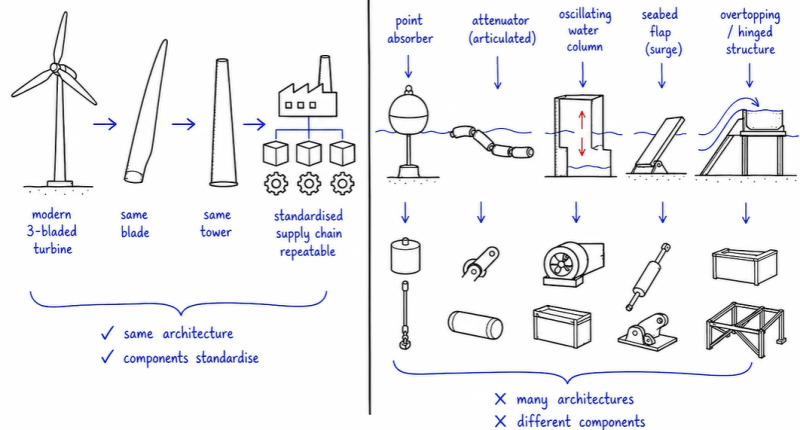
With the Earth’s atmosphere being effectively just a less dense fluid than the oceans around us, it’s reasonable to ask why we got wind turbines and wind mills quite literally everywhere across the globe to harvest the power in the wind, whereas ocean waves and currents aren’t being exploited quite as much. In a recent video by [Giordano Scarciotti] this issue with wave power is addressed, in particular the massive engineering challenges involved.
One of the main problems is simply one of cost, with wind energy having converged on a single design involving effectively the same three-bladed rotor, gondola and tower design that has been optimized for decades now. For wave energy there’s no such one-design-fits-all solution, with each attempted design having its own advantages and disadvantages that may prevent it from working in various sites, or incur high maintenance costs in the highly abusive marine environment.
Having more energy in waves than in wind is also both a benefit and a curse, as wave turbines have to work with the waves and not get demolished every time there’s a storm. Even wind turbines regularly fail in windy weather when e.g. the brakes fail, under conditions that would be considered mild in a marine context.
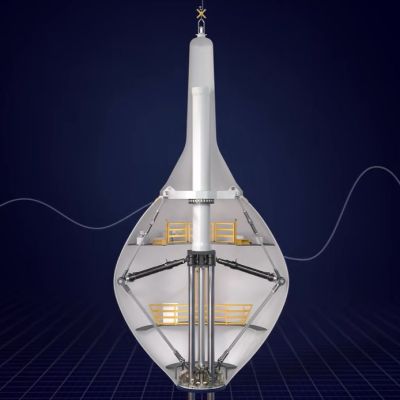
Also covered in the video is a new contender, in the form of CorPower Ocean’s new buoy-like design that bobs up and down on the surface. Here you need to carefully tune the turbine mechanism to work with the wave motion to extract the most energy. Their current design is be 19 meters tall, 9 meters wide and claimed to be capable of being installed in >40 meter deep water, producing power with a 40-60% capacity factor at 300 kW.
As yet another attempt at making wave energy turbines work, the most exciting aspect of it will be to see whether it can survive adverse weather, when careful tuning gets tossed out of the window and chaotic waves pummel what is essentially a very big hollow buoy. The single prototype has so far survived bad weather off the coast of Portugal during a year of testing, but the real test is long-term survival, as losing half your wave turbine farm to a really bad storm every five-odd years would quickly scuttle the project like it has previous commercial contesters.
Although not addressed in the video, the commercial challenge here is also not so much making the power generated over its lifetime (LCoE) economically attractive, but also its system integration cost in terms of required transmission lines, grid-level energy storage and backup power generators like baseload and standby power plants. Without equipping these wave power farms with grid-forming converters as TSOs are asking, dealing with reactive power to absorb and generate it, any resulting grid oscillations exacerbated by grid-following converters risk causing another expensive blackout as recently on the Iberian peninsula.
2026-09-17 23:30:35
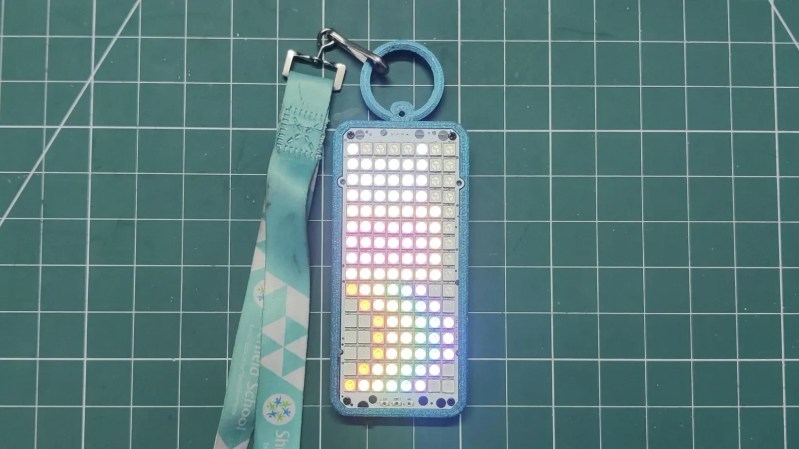
Head out to your next corporate conference, and you’ll probably be handed a little paper badge in a plastic holder so people can learn what to call you (or whether they should talk to you at all). It serves a function, but it’s a little soulless. [Aahan Sharma]’s Eye-D badge is a touch more interesting.
At the heart of the build is an ESP32-C6 microcontroller. It’s a capable part, with clock speed configurable up to 160 MHz, and wireless connectivity baked in. It’s hooked up to an 8 x 16 matrix of WS2812B addressable RGB LEDs, creating a color 128-pixel display. [Aahan] took advantage of the onboard Bluetooth Low Energy connection of the ESP32 to enable the display to be readily controlled by a smartphone, tablet, or laptop.
It can be configured to display a name, social handle, or custom message as desired. Beyond that, it can display animations, like an eye scanning around the room, Nyan Cat, or fire or Matrix-like effects just for the fun of it. There’s also a Draw Mode that lets one create their own pixel art on the display, too. [Aahan] wanted the build to feel like a serious conference badge, rather than a random electronic trinket, so whipped up a custom enclosure. The LEDs, microcontroller, and a battery, are all wrapped up in a tidy 3D printed housing with a ring for easily hanging the badge from clothes, lanyard, bag, or similar.
If you’re running your own little conference and have the budget for something cool, you might like to build a run of these. Or, you could explore some of the more advanced badge designs that are out there.
2026-09-17 22:00:55
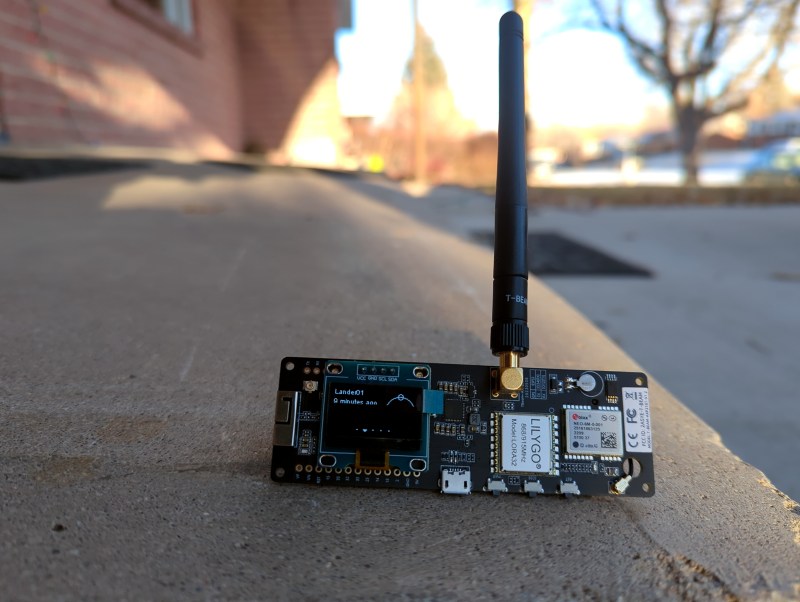
Although everyone has their own reasons for exploring a new hobby, one of the driving factors behind the popularity of Meshtastic and MeshCore has been the incredible accessibility offered by off-grid LoRa mesh networks. You don’t need any expensive hardware or a license to get on the air — armed with a $20 microcontroller dev board and open source software, you could be on the mesh in minutes. Then came the really exciting part, seeing who else was out there. The low barrier of entry and ad-hoc nature of these projects meant there was a good chance you’d soon find yourself exchanging messages with other like-minded folks in the area.
Or at least, that’s how it used to be. With the recent revelation that their default radio configurations have potentially been in violation of the Federal Communications Commission’s (FCC) regulations governing amateur usage of the 900 MHz industrial, scientific and medical (ISM) band, the users and developers of both Meshtastic and MeshCore have been sent scrambling. Getting in compliance isn’t necessarily a technical challenge. In fact, Meshtastic has already introduced changes aimed to address the issue and anyone running the latest alpha release can be sure that their initial radio configuration will meet FCC standards.
But unfortunately, this introduces a new problem. While it’s easy enough to get new installations of Meshtastic and MeshCore operating in a mode that keeps the FCC happy, doing so breaks compatibility with everything that’s already been deployed. The community will be fractured into distinct strata depending on when they first configured their hardware, with an added dash of confusion from the more rebellious users who will undoubtedly refuse to migrate over to the new settings.
What was once easy and accessible has just gotten a whole lot more complicated.
So how is it that both projects could have gotten as far as they have without realizing that they may be in violation of regulations that date back to the 1980s? It’s actually a bit tricky to nail down the timeline. Nothing has changed recently in the rules, and while it’s possible there were some back-channel discussions, the FCC has made no public acknowledgement of Meshtastic, MeshCore, or the general handling of LoRa mesh networks.
But if we go back to October of last year, we can see the first signs of potential trouble. Issue #945 in the MeshCore GitHub repository points out that the default radio settings in the US for both it and Meshtastic would appear to run afoul of FCC regulation 15.247. Specifically the second paragraph of subsection (a), which dictates the minimum allowed bandwidth. Out of the box MeshCore operates at 62.5 kHz and Meshtastic uses 250 kHz, but the FCC says it needs to be 500 kHz or higher.
The resulting discussion, which spans several hundred messages and is still seeing activity as recently as this week, paints a fascinating picture and illustrates one of the reasons it’s taken so long for the issue to gain traction. Although the text of 15.247 may seem straightforward enough at first glance, there’s always room for interpretation with documents like this.
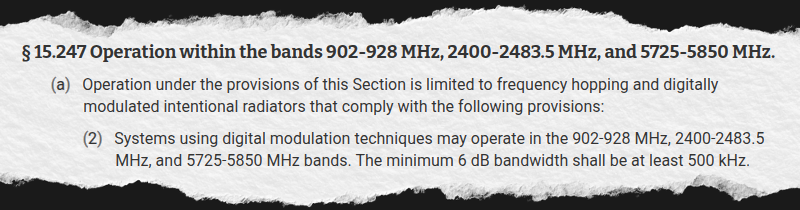
Some pointed out that subsection (a) states that it is “limited to frequency hopping and digitally modulated intentional radiators,” as evidence that it doesn’t apply as neither project utilizes frequency hopping. Others felt that the rules were only intended for devices with higher output power, and some even expressed a disbelief that the manufacturers would allow the modules to operate in a non-compliant mode in the first place.
Put simply they couldn’t decide if 15.247 was something they really had to worry about, and without any official word coming down from the FCC, were reluctant to throw the community into turmoil over it.
While MeshCore users debated if they should switch over to 500 kHz, many Meshtastic users started exploring alternate radio configurations for a very different reason. Its default 250 kHz mode, known as Long Fast, was never designed for networks with hundreds of radios in an urban environment. Taking advice provided by the developers themselves, operators of large networks such as the one in Philadelphia started testing other modes to see if they would fare any better.
As it so happens, one of the modes tested by the operators of Philly Mesh this summer happened to be Long Turbo, one of the two available modes that utilizes a bandwidth of 500 kHz. Their findings, which have since been widely cited online, were underwhelming to say the least. Part of the problem seems to have been due to bugs which went undiscovered up until that point due to the relatively limited testing of Long Turbo mode. Unfortunately, even after the bugs were addressed upstream, they noted some of the hardware they tested seemed unable to operate properly when switched into 500 kHz mode.
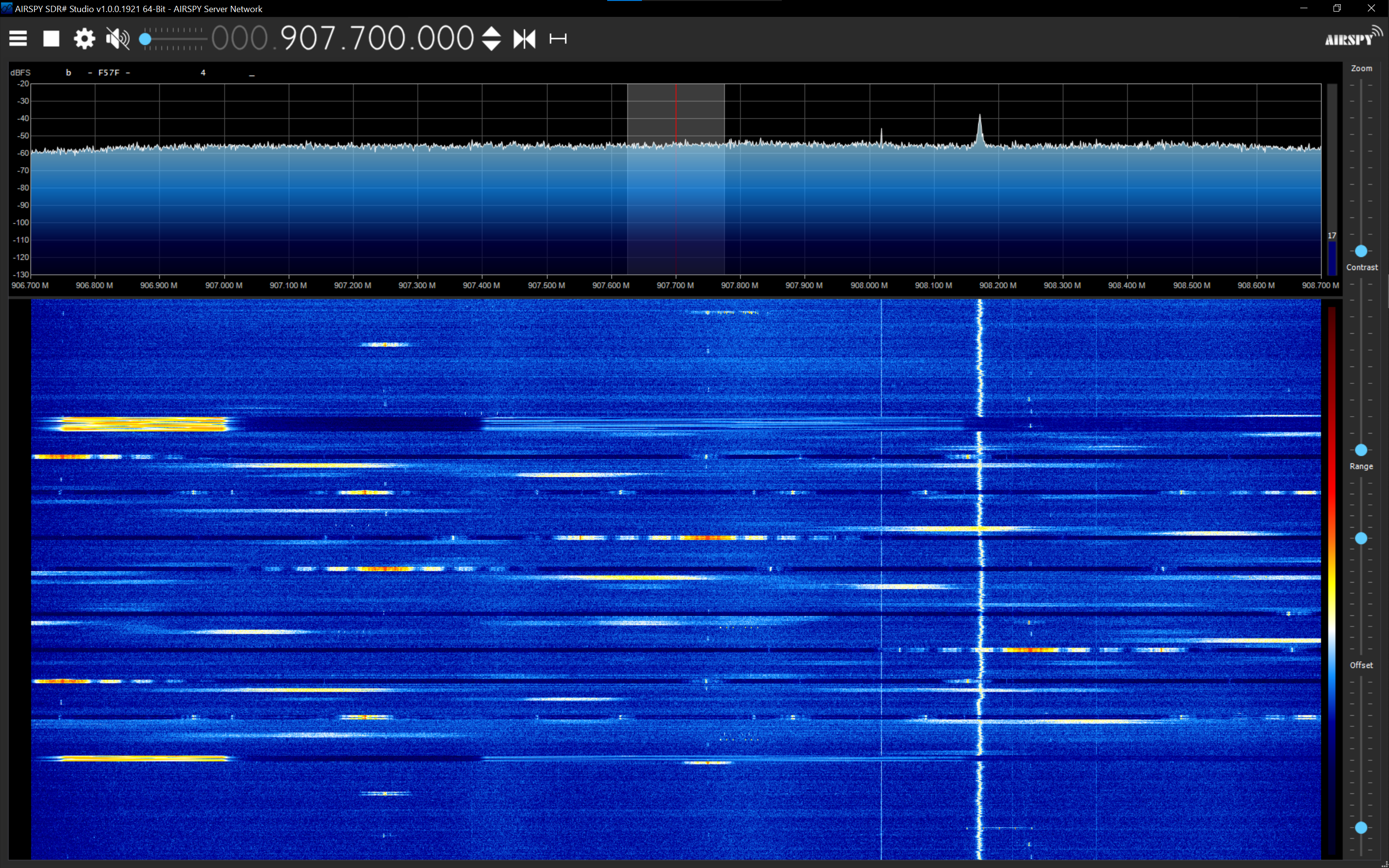
But the biggest problem they encountered was interference from other devices on the ISM band. In a dense urban environment like Philadelphia such interference is essentially unavoidable, but they found that Meshtastic operating at 500 kHz was especially susceptible to the electromagnetic din of the city. From their investigations, they theorize that the narrower bandwidth used by Meshtastic’s default mode was better able to slip through some of the interference, while the wider 500 kHz mode was more likely to collide with other transmissions.
Given its poor performance at 250 kHz in an urban environment and the growing concern that anything less than 500 kHz could draw the ire of the Federal Communications Commission, Philly Mesh caused a considerable wave in the community earlier this month when they announced they would be switching to MeshCore.
While MeshCore was also impacted by interference at the FCC-compliant 500 kHz, during their testing Philly Mesh found that its protocol seemed to handle the situation more gracefully. The announcement also explained that they hadn’t given up on Meshtastic entirely, and that future installations may run both. But at least for the time being, it was determined that MeshCore offered them the best chance of creating a reliable mesh network in Philadelphia — a goal which superseded any loyalty they may have felt to one particular project.
 This decision completely shifts the balance of the mesh community in Philadelphia and the surrounding area. Not only will users running older Meshtastic radios set to 250 kHz be unable to communicate with newer installations operating at 500 kHz, but both groups would also be separated from radios that were being switched over to MeshCore — which themselves may also be operating at various bandwidths depending on how they were configured.
One large network which could be accessed by anyone using Meshtastic’s default configuration has now been broken into several factions. In theory everyone could simply start over from scratch and move over to the same configuration, but the potent combination of tribalism and apathy is all but guaranteed to keep many users in their respective niche, kicking off what’s essentially a LoRa turf war.
It’s too early to tell what will become of Philadelphia’s mesh aspirations. There’s little reason to question their analysis of the situation on the ground, and it could very well be that using a custom MeshCore configuration is the best way for them to achieve their stated goals. But it’s still a painful transition, and you can be sure that other large mesh networks in the Northeast and beyond will be keeping an eye on the situation as they consider their own futures.
Featured image: “Meshtastic T-Beam” by [Chiffre01]


