


2026-09-25 19:45:31
Despite the predictions that no one would ever put build data centers in space, Google is starting on Thursday. Google’s prototype satellite will be one of 130 payloads on SpaceX’s Transporter 18 mission on October 1.
The server will follow a dawn-dusk orbit, a special case of a sun-synchronous orbit (SSO), following the terminator line between daylight on dark on the earth below. A dawn-dusk orbit allows the satellite’s solar panels to stay in nearly continuous daylight, while also being in a relatively inexpensive low earth orbit (LEO). Geostationary orbit (GEO) would allow solar panels to always receive sunlight, but launching a satellite into GEO requires more fuel and so is more expensive.
Another advantage of LEO is that radiation levels are a couple orders of magnitude less than at GEO. Lower radiation means electronics do not need to be as hardened against radiation.
A dawn-dusk orbit would not be possible if the earth were perfectly spherical. The earth’s equatorial bulge makes it possible to design an orbit that precesses once per year. David Hammen explains this in an answer to a question on the Space Exploration Stack Exchange site.
If the Earth had a spherically distributed gravitational field, a satellite’s right ascension of ascending node would be constant. … Fortunately, the Earth’s gravitational field is not spherical. The Earth’s rotation results in an equatorial bulge. This equatorial bulge causes RAAN to precess (or recess). …
Sun synchronous orbits are chosen so that RAAN precesses by 360 degrees per year, or a bit less than one degree per day. …
A dawn-dusk satellite is a special case of a sun synchronous orbit. … A dawn-dusk orbit typically does not quite follow the terminator. Following the terminator would require a rather high orbit.
2026-09-23 22:11:52
In the novel Carry On, Mr. Bowditch, a sailor asked Nathaniel Bowditch to teach him how to do navigational calculations, but the man only knows how to add and subtract by counting on his fingers. He had not heard of multiplication. Bowditch is surprised, but realizes if he made tables of logs of trig functions, then it would be possible for barely numerate sailors to calculate their position.
Carry On, Mr. Bowditch is fiction, but it’s essentially factual, and so I imagine something like the conversation above did happen. I thought about how this might work, and it would be difficult.
It is true that if someone can add, subtract, and look-up numbers in a table of logarithms, they can effectively multiply. To find the product xy, they would look up the logarithms of x and y, add the results, then use the table in reverse to find what number has a logarithm equal to the sum.
But there are a couple difficulties in this imagined scheme. First, every calculation would require a lot of steps, including looking up numbers in multiple tables. It’s likely someone who cannot multiply also cannot read, so writing down instructions might not be viable. Second, carrying out calculations using tables is usually not simply a matter of looking up numbers; there are other things someone would need to know, such as interpolation and range reduction.
Bowditch was trying to train innumerate sailors to do specific calculations, not general mathematics, and so there would be ways to mitigate the problems above. Maybe he could create diagrams that would allow a semi-literate person to carry out an algorithm. The sailor wouldn’t need to be able to read per se. The instructions could be aids to help him recall memorized steps. The specialized nature of the calculations might also eliminate the need for range reduction and interpolation.
How many tables would be necessary? Someone who understands trigonometry doesn’t need separate tables for sine and cosines. And they wouldn’t need a table with entries for all angles. A table of sines for angles between 0 and 45° would be enough. But someone who doesn’t know multiplication would need more tables and bigger tables. Or they would need instruction in how to get by with less. It would be an interesting trade-off.
The novel mentioned tabulating logs of trig functions. For example, if you need to calculate
cos(a) cos(b)
it would be convenient to be able to look up log(cos(a)) and log(cos(b)) rather than look up the cosines and then look up their logs. But you’d still need to be able to convert
log( cos(a) cos(b) )
into
cos(a) cos(b).
This would require a table of logarithms, if the user is able to infer exponentials by reading a table in reverse. Otherwise you’d need a table of exponentials.
In general, you can assume less sophistication from a user by increasing the number of tables. But this also complicates the instructions the user must follow.
To give a specific example, suppose a sailor wanted to calculate his position using the law of haversines:
hav(c) = hav(a − b) + sin(a) sin(b) hav(C).
A mathematically sophisticated sailor would only need a table of sines to infer c from a, b, and C. He could calculate haversine via
hav(θ) = sin²(θ/2),
though inverting hav(c) to solve for c would require calculating a square root, either directly or via a table.
If one were to minimize the amount of sophistication needed by maximizing the use of tables, the algorithm for finding c would be
This would require five tables: sine, log sine, log haversine, exponential, and inverse haversine.
Bowditch’s effort to make navigation accessible to the uneducated is an example of condescension in its literal and positive sense. If we say a person is condescending, we imagine an arrogant person who belittles those around him. But condescension literally means coming down to be with someone. Theologians use the word to describe the incarnation of Christ.
Like all scholars, Bowditch wrote for his peers, notably in his English edition of Laplace’s magnum opus on celestial mechanics. But unlike most scholars, he also devoted years of his life to a making knowledge accessible to uneducated men, culminating in his book The New American Practical Navigator, still in print here [1].
[1] The book has been updated over the last couple centuries. Obviously the section on GPS, for example, does not date back to Bowditch.
The post Navigation with only addition, subtraction, and tables first appeared on John D. Cook.2026-09-22 22:01:30
A couple days ago a friend told me about the book Carry On, Mr. Bowditch, a fictional account of the life of Nathaniel Bowditch (1773–1838). I’ve been listening to the book on Audible, and apparently it’s only lightly fictionalized.
Bowditch was a self-educated mathematician and astronomer, best known for his book The American Practical Navigator, first published in 1801. The book has been continually revised over the last two centuries and is still in print, available for download from the National Geospatial-Intelligence Agency. The latest edition begins with a brief account of Bowditch’s life, confirming the essential details of the fictional biography.
Two things stand out about Bowditch: his attention to detail and his desire to make ideas accessible. He taught himself Latin in order to read Newton’s Principia and followed the text so closely that he found a number of errors.
Bowditch’s navigation book grew out of the numerous corrections he made to error he found in John Hamilton Moore’s The Practical Navigator, the leading navigation text of the time.
At the beginning of the 19th century it was theoretically possible to determine time, and hence longitude, from lunar observation. However, the method required ideal observation conditions and laborious calculation. Bowditch developed a way to make the necessary measurements under more general conditions, and simplified the necessary calculations. According to the biographical preface mentioned above,
Bowditch vowed while writing this edition [of his navigation text] to “put down in the book nothing I can’t teach the crew,” and it is said that every member of his crew including the cook could take a lunar observation and plot the ship’s position.
After completing The American Practical Navigator, Bowditch began an English translation of Pierre Laplace’s encyclopedic Mecanique Celeste, filling in details to make the work accessible to a wider audience. He was able to translate four out of the five volumes by the end of his life.
2026-09-22 07:13:22
Suppose you want to solve a triangle. You know two sides and the angle between them. Then you can solve for the third side using the law of cosines.
Now suppose you want to solve a big triangle, a triangle on the surface of the earth so large that the curvature of the earth matters. You can still use the law of cosines, but you’ll need the spherical law of cosines:
cos(c) = cos(a) cos(b) + sin(a) sin(b) cos(C).
If you know the (angular) lengths of sides a and b, and (tangential) angle C between the two sides, you can solve for c by taking the inverse cosine of the right hand side above.
Now suppose you want to solve this big triangle because you’re a navigator on a ship a couple centuries ago, doing calculations by looking up trig functions and inverse trig functions in a table. You’re interested in triangles that are so big that you have to account for the fact that you’re living on a sphere. But at the same time, your triangles are still fairly small relative to the size of the globe.
The numbers a and b will often be fairly small, and so their cosines will be near 1 and their sines are near zero. So the calculation
cos(a) cos(b) + sin(a) sin(b) cos(C)
will add a number near 1 and a number near zero. That’s a problem.
Say you’re working with five decimal place arithmetic. Then if the second term above is less than 10−5, its contribution to the sum gets completely lost in the addition to the first term. If the second term is larger than 10−5 but still small, its contribution to the sum will be partially lost.
Enter the haversine, defined by
hav(θ) = (1 − cos(θ))/2.
The expression 1 − cos θ was called the versine, and so half of the versine is the haversine.
In terms of the haversine, the law of cosines above becomes the law of haversines:
hav(c) = hav(a − b) + sin(a) sin(b) hav(C).
Now suppose you have a table of haversines and inverse haversines. The law of haversines requires a little less work: you have one less table lookup, and you trade a product for a subtraction.
But the primary advantage is numerical accuracy: the terms on the right side have roughly the same size.
Note that we’re assuming the values in your table of haversines have been calculated correctly to the given precision. If you calculated your own values of haversines from the definition above, you’d lose precision in the subtraction 1 − cos θ, defeating the advantage of the law of haversines [1].
According to Wikipedia.
The first table of haversines in English was published by James Andrew in 1805, but Florian Cajori credits an earlier use by José de Mendoza y Ríos in 1801. The term haversine was coined in 1835 by James Inman.
I ran some experiments that carried out arithmetic in float16 (11 bits of precision) to approximate what someone might have done by hand. When the difference between a and b was on the order of 1° or 0.1°, the law of cosine method often overflowed: the right-hand side evaluated to something larger than 1 even though theoretically it should be less than 1. The haversine method never overflowed.
The median error for the haversine method was a couple orders of magnitude less than that of the cosine method.
[1] hav(θ) = (1 − cos(θ))/2 = sin²(θ/2). If you calculated hav θ by looking up sin(θ/2) and squaring it, you’d be doing extra work, but you wouldn’t have numerical problems.
The post Haversine law first appeared on John D. Cook.2026-09-19 09:17:36
Nothing grows exponentially forever. What appears to be an exponential curve often turns out to be some sort of S curve, such as a logistic curve.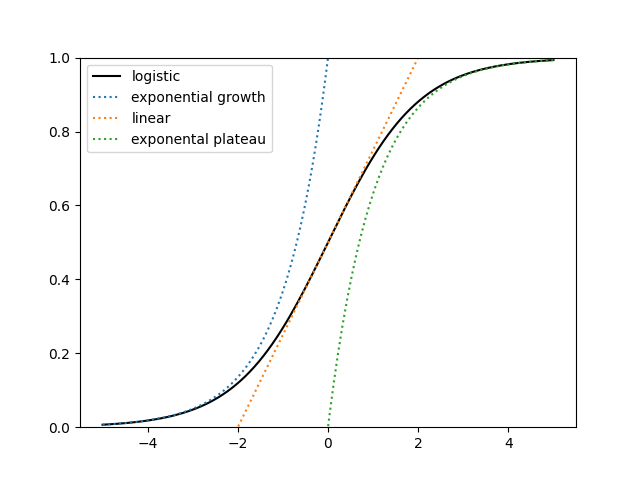
Suppose you’re collecting data on the left side of the curve. If there’s even a small amount of error in your data, you won’t be able to predict the asymptotic value with any accuracy. But if you have data on both sides of the inflection point, you can make a good prediction of the limiting value.
I’ve written about this before, explaining that the problem is hard, but I didn’t say why it’s hard. Here I’d like to give an idea why it’s hard.
Suppose you want to fit a logistic equation
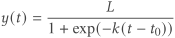
to three distinct values of t and the corresponding values of y. There is a unique solution, but in general you cannot find a solution in closed form. However, if the values of t are evenly spaced

there is a method [1] to solve for the parameters L, k, and t0. For this post we’re only interested in the limiting value L, and it can be found by
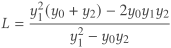
independent of h.
To find out how small changes in the y‘s change the estimate of L, we take the partial derivatives of L with respect to the y‘s and find
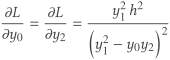
and
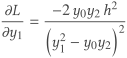
All three derivatives have the same expression in the denominator: y1² − y0y2.
If the function y(t) were an exponential, this expression would be exactly zero [2]. The function y(t) is not exactly exponential, but it is approximately exponential when the t‘s are in the left or right tail of the logistic curve. The further out in either tail the t‘s are, the closer the expression is to zero.
So when all the t‘s come from the same side of the inflection point, y(t) is nearly exponential the partial derivatives are huge and so the fitted value of L is extremely sensitive to changes in the y‘s.
As a concrete example, set L = k = 1 and t0 = 0. Evaluate y(t) at −2, −1.5, and −1. Then the values of y are
y0 = 0.11920292
y1 = 0.18242552
y2 = 0.26894142
If you forecast L using exactly these three values you’ll get L = 1.
But if you change y0 to 0.12374097, the forecasted value of L is infinite. Values of y0 in the interval [0.11920292, 0.12374097] predict values of K in [1, ∞].
[1] Raymond Pearl and Lowell J. Reed. On the Rate of Growth of the Population of the United States Since 1790 and its Mathematical Representation. Proceedings of the National Academy of Sciences of the United States of America, Vol. 6, No. 6 (Jun. 15, 1920), pp. 275-288
[2] exp(x + h)² = exp(x)² exp(h)² = exp(x) exp(x + 2h)
The post Why fitting a logistic is nearly impossible from early data first appeared on John D. Cook.
2026-09-18 00:48:14
There’s a common saying in discussion of fractals that the length of a coastline depends on how small a device you use to measure it. I thought this was a hypothetical, say as applied to the steps in the construction of the Koch snowflake. But the saying has its roots in actually surveying.
Lewis Fry Richardson (1881–1953) noticed that the length of the coast of Scotland depended on the size of segments used to measure it. More specifically, he found that the length followed a power law, i.e. that there’s a linear relation between the log of the coastline length and the log of the ruler length.
Here’s a reproduction of Richardson’s plot, taken from [1].
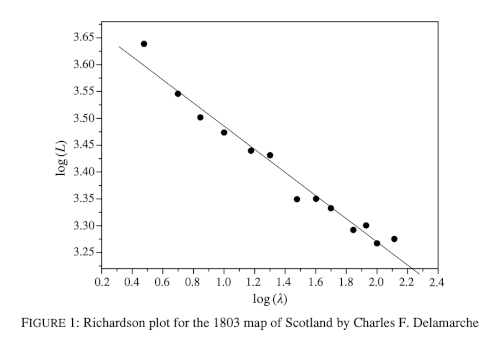
Mandelbrot built on Richardson’s observation and defined the idea of fractal dimension.
I was under the impression that fractals were invented as mathematical novelties that researchers later found applications for. But as is often the case, the applications came first. Or at least some applications came first.
Ideally there’s always a feedback cycle where applications lead to theory and theory leads to applications. As Donald Knuth put it, “The best theory is inspired by practice. The best practice is inspired by theory.”
[1] Eoghan Bradley and Mark McCartney. Four hundred years of the fractal coastline of Scotland. The Mathematical Gazette, November 2019, Vol. 103, No. 558 (November 2019), pp. 518-521
The post Empirical fractal first appeared on John D. Cook.
