


2026-09-27 08:00:00
Hello! Recently I needed bike lights for my bike. And I remembered that I already had rechargeable bike lights that I bought ten years ago, that I hadn’t tried in a long time. I tried to recharge them, but after fully charging them, they only worked for maybe 5 minutes before they turned off again.
I don’t know much about electronics, but I’ve been curious about whether it’s possible to fix old electronics for a long time, and this seemed like the perfect repair project because I might just need to replace the battery.
So I went to the local queer makerspace where I’m a member to use the soldering iron and try to do it! I don’t know much about electronics and this post does not contain any safety advice because I don’t know much about safety. I think it’s nice to do projects in a community space where you can get help.
The bike light felt like it was made of silicone, so I cut open the silicone in a haphazard way along something that vaguely looked like a seam.
I definitely ripped some silicone in the process and it was pretty messy but I got it open and found the circuit board.
I don’t know the model number of the bike lights but there’s a photo of them at the end of the post.
There were some screws attaching things together so I removed them so I could get the circuit board out.
Mostly I tried to remove as few screws as possible because I was worried about losing them or not being able to put them back after. I probably put the screws in a bag or something.
I took out the circuit board. Here’s what it looked like:
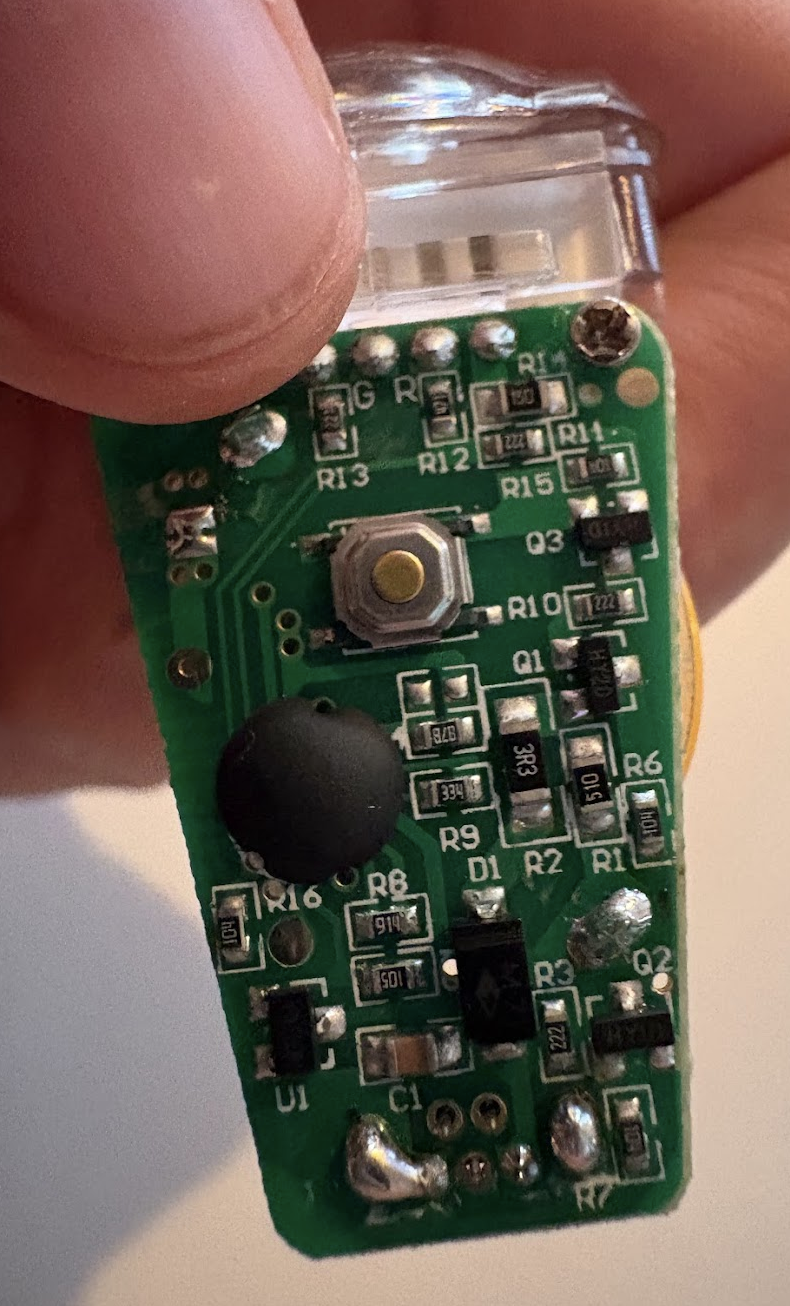
You can see where the battery is attached, I think it’s left of RI3 and above Q2.
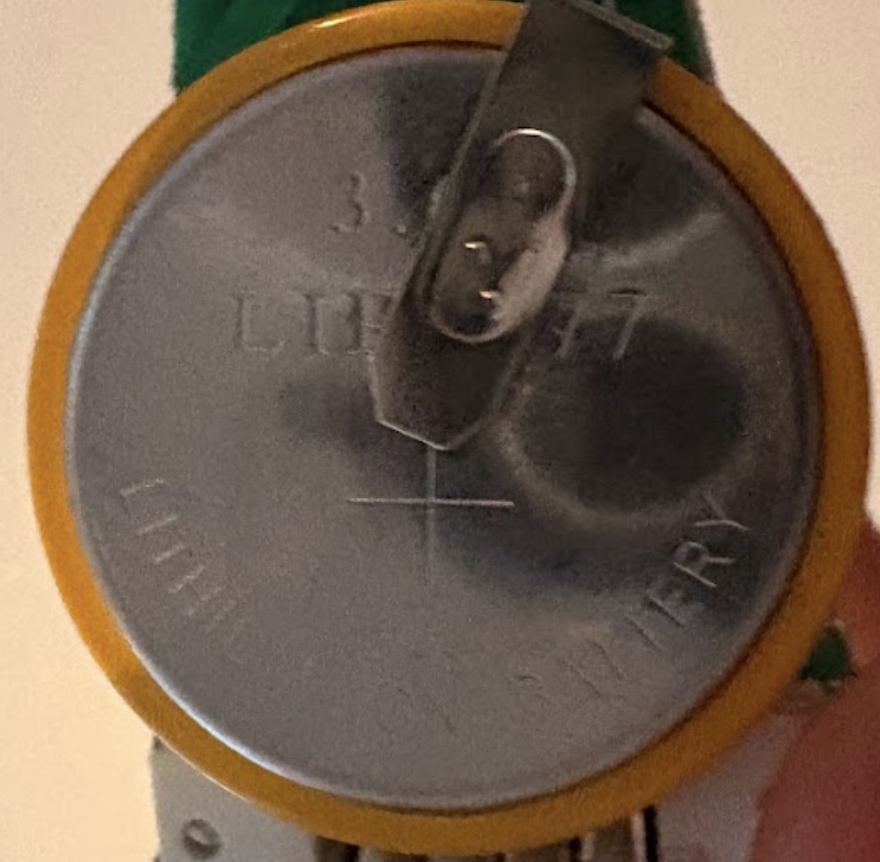
Here’s what the battery looked like:
I’d never desoldered anything before, so I found the iFixit guide to desoldering and read it. Also I asked my friends Lee and Lauria for advice.
Here were the steps I ended up following based on the guide & the advice I got:
In the picture of the battery in Step 3, you can see it says something like “3” and “LI???77”. There’s a piece of metal that I think is welded or something to the top of the battery. It seemed impossible and also maybe not smart to try to remove so I wasn’t sure how to find out what an “LI????77” was or how to order another one.
I’ve been trying to avoid using LLMs (though I will not get into that because I am exhausted by LLM discourse and I’m sure you are too), but I really had no idea how to figure out what the battery was so I asked an LLM. It gave the response “LIR2477”, which (when I looked it up) looked exactly the same as my battery so I figured that was plausible.
I would be interested to learn non-LLM ways to figure this out though. There must be a way. Lauria showed me how to use DigiKey’s search which was very cool though DigiKey didn’t have that part.
(edit: someone in the replies told me that this kind of coin cell battery is named according to its dimensions, and you can use plastic calipers to measure the dimensions of the battery. So I guess a non-LLM way would be to measure the battery with calipers and try to match it to something on the List of battery sizes Wikipedia page, though that page only mentions CR 2477 and not LIR 2477. It’s a good example of what’s fun for me about trying to avoid LLMs, this “List of battery sizes” page is super interesting and if I use an LLM I might never find it)
I went to AliExpress and ordered:
I think the batteries were $3 each and the glue was $8.
The parts took maybe 2 weeks to arive, and once they arrived, I went back to the makerspace and:
Then after waiting some amount of time for the glue to dry I took it home and waited 24 hours for the glue to cure.
Also I took the old batteries to somewhere nearby that accepts old batteries.
The lights work! I have used them to bike at night! I still haven’t needed to recharge them (and tragically I had to order a new Mini USB cable because I got rid of all my Mini USB cables, so I’m still waiting for that), so I still don’t know for sure how long the lifetime of the new battery will be.
Here’s what the light looks like after re-gluing. You can see that I didn’t glue very carefully. It didn’t really go back together that well but I’m hoping it’ll be good enough.
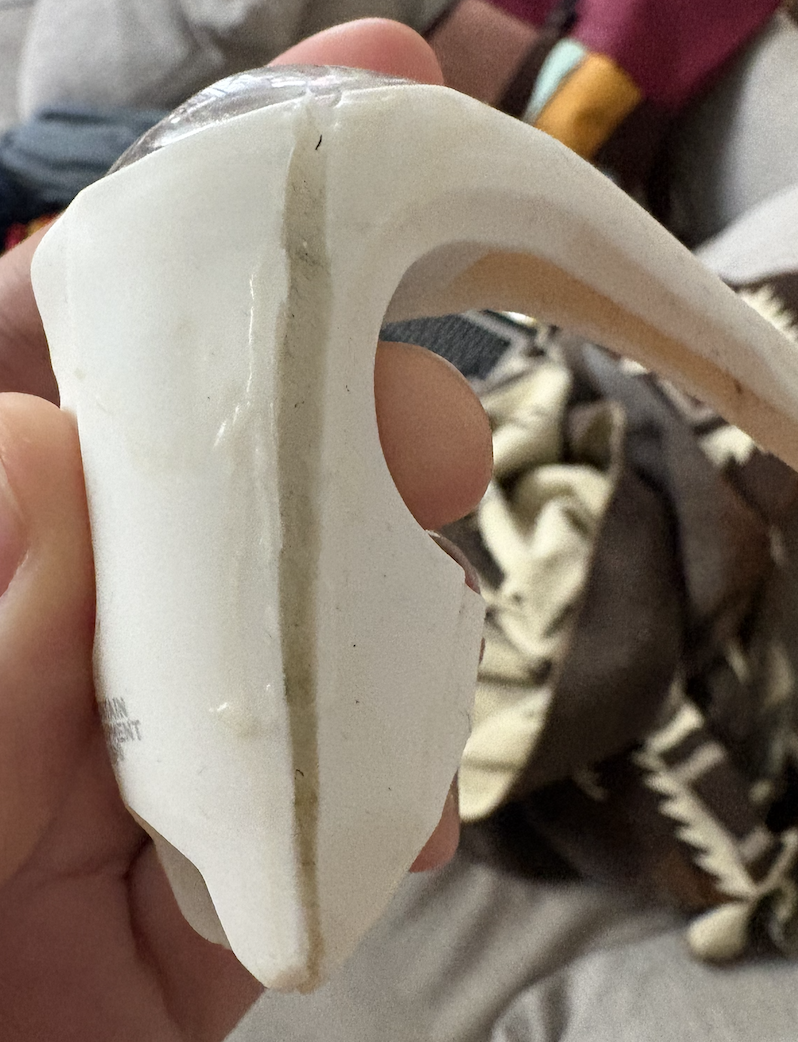
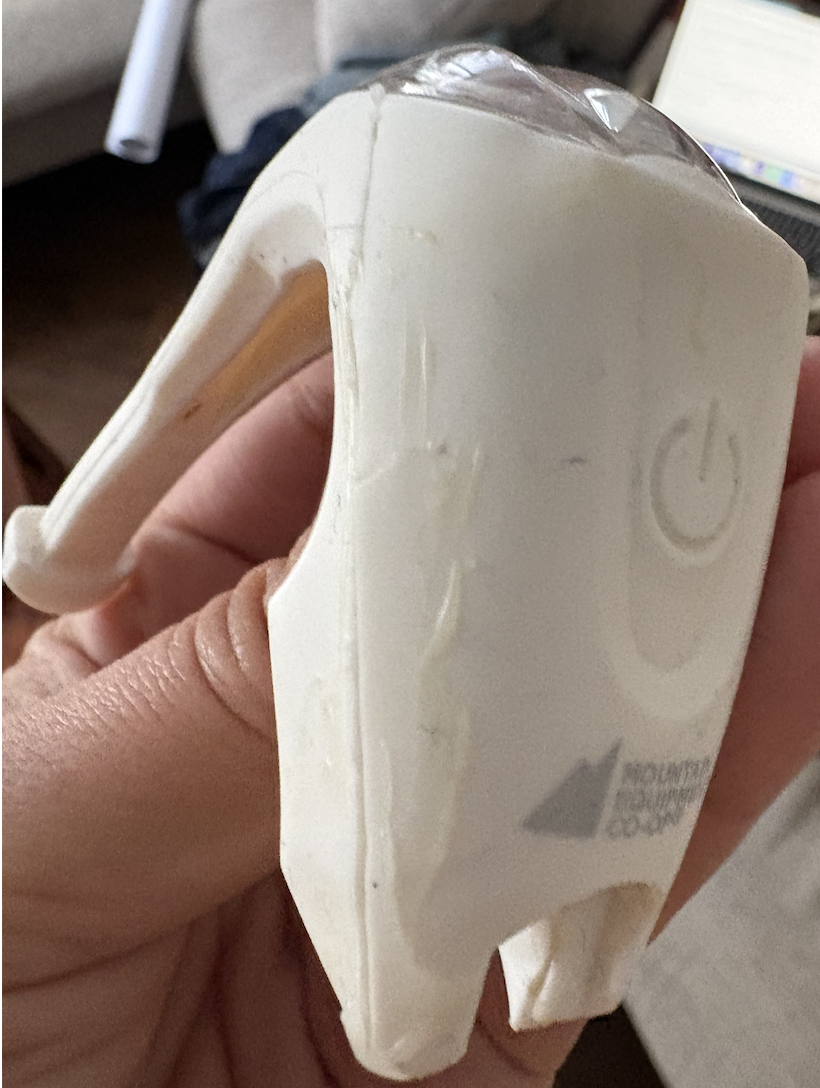
I thought it was really cool that I was able to do this with extremely minimal electronics skills! It cost about $20 CAD to buy the parts, and (whether or not the repair holds up, I’ll try to update this post in the future!), it was fun to try to repair something and learn something new.
2026-07-21 08:00:00
Hello! I’m on a funny journey right now where I’m trying to learn how to make websites in a sort of 2010 style, where I have an SQL database and render some HTML on the backend.
It’s kind of an interesting journey because it doesn’t necessarily feel “easy” to me to make websites in this way: I never learned how to do it in the 2000s or 2010s, and there’s a lot I need to learn.
So here are some Django features that make building this kind of site feel more achievable than when I was trying and failing to use Go’s standard library or Flask. And I’ll talk about a couple of issues with Django I’ve run into.
Previously the toolkit I felt confident with for making websites was:
I really liked this frontend-heavy approach for these super simple applications but when I started thinking about making something with a lot of different pages (instead of literally just one page), I didn’t feel so excited about the options I saw that involved a lot of frontend code. So I figured I’d try the backend.
Writing a backend-focused site that uses as little JS as possible feels the same to me in a way as writing a single-page JS website that does as little on the backend as possible, even though they might seem like opposites. In both cases I’m just trying to keep as much of the logic as possible in one place.
Now for some thoughts about Django!
I learned that I can define a “query set” class in Django with a bunch of
methods with different WHERE statements I might want to use while constructing
a query:
Here’s how I use it in my view code once I’ve defined what all the methods mean:
Events.objects.approved()
  .for_tab(tab)
  .with_festivals(tab_params.festival_slugs)
  .is_free(tab_params.free)
  .is_outdoors(tab_params.outdoors)
and here’s how I define the methods:
class EventQuerySet(SearchableQuerySetMixin, models.QuerySet):
    def approved(self):
        return self.filter(approved_at__isnull=False)

    def future(self):
        today = timezone.localdate()
        return self.filter(end__gt=self._midnight(today))

    def with_tags(self, tags):
        if tags:
            return self.filter(tags__name__in=tags).distinct()
        return self
The syntax for defining the filters isn’t my favourite, but I spend most of my time just using the methods, and it feels super readable and nice to use, and it makes me want to look into other query builder libraries in the future. In the past I thought “I know SQL, who needs a query builder?”, but this kind of structure does make it really nice to read.
I found an example of someone who wrote their own small query builder in Python that I want to read later to think about whether I would enjoy using a more minimal version of this.
There are a bunch of little quality of life filters available in Django templates that are super useful for generating HTML. The ones I’ve used so far are:
<br> ({{ event.description|urlize|linebreaksbr }} ){{ row.date|date:"M j" }})json_script, which takes a Python dictionary and automatically converts it to JSON and inserts it into the HTML as a <script> tag in a safe wayThese are all small things individually but I feel like it makes a big difference somehow to just have them available.
querystring is coolI think my favourite template filter is querystring: in this site sometimes
we use filters like ?date=2026-06-01 to decide what’s displayed. querystring
that will make a link to the same query string with one change, like this to
link to the previous date:
<a href="{% querystring date=nav.prev_date%}">
Or to remove the outdoors parameter:
<a href="{% querystring outdoors=None %}">
I still really love Django’s automatic database system. It’s amazing to be able to just edit a model to add a new field or whatever, and then Django automatically generates the migration.
So far we have done 19 database migrations and I think there will probably be more! It makes a huge difference for me to be able to just easily change the database as my understanding of the problem changes.
Django’s documentation sometimes offers the option of using class-based views and inheritance to organize the code in your views. For example I have four views that share a lot of code, and I could use inheritance to manage that by defining some kind of parent class and then having my other views inherit from it.
I tried it out and I did not enjoy the experience of using inheritance to share code between views. I switched to using functions instead, sort of how this post advocates, and that was a lot more straightforward. I’ve never had a good experience using inheritance in Python and I don’t think I’ll try to use it again.
But I don’t mind using inheritance to use the interfaces Django itself provides: for
example if I want to define a query set I need to write something like
class EventQuerySet(SearchableQuerySetMixin, models.QuerySet).
I don’t think too hard about it and it seems to work.
(as a meta comment: I’ve been working on talking about my programming opinions by just saying “THING does not feel good to me, I prefer OTHER THING instead”. That post I linked to says that function-based views are the “right way”. I’m not very invested in whether it’s “right”, but it’s validating to know that other people feel similarly to me about inheritance)
At some point the LLM scrapers discovered our site, and started sending us maybe 10 requests per second. I blocked them which is working for now, but it made me think about what the site’s capacity is. I’m used to writing Go backends where the performance situation is pretty straightforward (usually everything is just fast enough), and a Django site is very different.
Some light load testing (with (ab -n 1000 -c 1) shows that right now we can
serve about 2-3 requests per second (on a ~$10/month VM).
It’s tempting for me to go down a rabbit hole where I do a bunch of profiling to figure out what’s slow and try to make it faster (there’s py-spy for that, and py-spy is great and super easy to use, and profiling is fun!) But I really don’t understand what I should expect in terms of performance from a Django site and how I should be thinking about at a higher level.
Some things I haven’t figured out yet:
I think one thing I’m learning about Django is that because it’s a Framework (tm), it’s easy to accidentally misconfigure it. For example, when I was thinking about why my site was slow just now, I read the django performance docs and I noticed a comment saying:
Enabling the cached template loader often improves performance drastically, as it avoids compiling each template every time it needs to be rendered.
When I’d done CPU profiling I’d noticed that it was spending a lot of time rendering templates! Maybe this could help me!
Clicking through the link, I saw that the cached template loader was supposed to be on by default, but I’d turned it off by accident while trying to do something else. I think this “I turned off the cached template loader by default” things is an example of how I still find the django settings file to be pretty confusing and difficult. I guess I should just be careful when I go in there.
After turning on template caching, it seems like the site can now pretty easily handle 12 requests per second or so without using all of the CPU. I have not carefully benchmarked the before and after but it seems like it’s made a pretty big difference.
One thing that’s been surprising to me about Django performance is that I’ve always heard the advice “if you have a performance problem, check your database queries! Maybe add an index!”. But I’ve been running into a variety of performance issues (like this template caching thing) that are not because of slow queries, so instead it’s been more useful for me so far to start by running a CPU profile. And since I’m using SQLite, any slow database query problem will show up on the CPU profile anyway.
Anyway I don’t want to get too far into site performance. Like I said it’s easy for me to get interested in profiling, but actually I know a lot about profiling and it’s not the most important thing for me to learn about.
I might say more about what I’m enjoying (or having a hard time with!) about Django later. Trying to write some shorter blog posts recently.
2026-07-17 08:00:00
Hello! I’ve been working on a Django site recently, and I decided to use SQLite as the database. When I was getting started with using SQLite as database for a website I read a bunch of blog posts about how it is totally fine to use SQLite in production for a small site and I think it is totally fine, but what I did not fully appreciate is that SQLite is still a database, databases are complicated, and I do not know a lot about operating databases.
So here are a couple of small things I’ve been learning about running SQLite. This is the 4th website I’ve used SQLite for, and I think this one is harder because with the power of the Django ORM I’ve been making the database do more work than I was previously without Django.
I started by turning on WAL mode like all the blog posts said to do and hoping for the best.
ANALYZE is apparently importantToday I was running a query (using SQLite’s FTS5 for full-text search) on a table with 4000 rows and it took 5 seconds. That seemed wrong to me: computers are fast!
It turned out that what I needed to do was to run ANALYZE!
Immediately the problem query went from taking 5 seconds to like 0.05 seconds
(or some other number small enough that I didn’t care to investigate further).
I still don’t know exactly what went wrong in the query plan,
but my best guess is that it was some sort of accidentally quadratic thing.
ANALYZE generates “statistics” (I guess about the number of rows in each table? and presumably other things?)
so that the query planner can make better choices.
Maybe one day I’ll learn to read a query plan.
Occasionally I’ve run into situations where I accidentally put a bunch of rows in my database that I don’t want to be there (for example completed tasks from django-tasks-db), and I want to clean them up.
What’s happened to me a few times in this case is:
My approach so far has been to just do these cleanup operations in small batches so that I don’t need to do database queries that take more than 5 seconds to run. This whole experience has given me more of an appreciation for why someone might want to use a “real” database like Postgres which can have more than one writer at the same time though.
Maybe in the future I’ll just take the site down for scheduled maintenance instead when I need to do this kind of thing, but I haven’t figured out a workflow for that yet.
So far I’ve been using Django’s ORM to make any query I want without paying any
attention at all to query performance and it’s mostly been going okay other
than the ANALYZE thing. The database is pretty small (maybe 10000 rows?) and
I expect it to stay pretty small forever, so I’m hoping that that plan will
keep working.
I’ve done SQLite backups a couple of ways. I don’t think I’ve actually tested restoring from my backups but I do usually try to monitor them with a dead man’s switch.
way 1: restic
sqlite3 /data/calendar.db "VACUUM INTO '/tmp/calendar.sqlite'"
gzip /tmp/calendar.sqlite

# Upload backup to S3
# Sometimes the backup gets OOM killed and so it stays locked, do an unlock
restic -r s3://s3.amazonaws.com/some_bucket/ unlock
# Do the backup & prune old backups
restic -r s3://s3.amazonaws.com/some_bucket/ backup /tmp/calendar.sqlite.gz
restic -r s3://s3.amazonaws.com/some_bucket/ snapshots
restic -r s3://s3.amazonaws.com/some_bucket/ forget -l 1 -H 6 -d 2 -w 2 -m 2 -y 2
restic -r s3://s3.amazonaws.com/some_bucket/ prune
way 2: litestream
I started trying out Litestream recently because I felt like doing incremental backups might be more efficient: my restic backups were sometimes getting OOM killed, and I was a bit tired of it. Basically I just write a config file and run:
litestream replicate -config litestream.yml
I set retention: 400h in my config file in an attempt to
retain some amount of history of the database but I have no idea if it works.
I’ve been backing up to AWS, which is always a pain because it’s annoying to navigate the AWS console to generate credentials. Maybe one day I’ll move away to some other S3-compatible alternative.
My current project only has one database, but one trick I used with Mess with DNS was to split the tables into three separate database files because I didn’t actually need my tables to be in the same db. I think it was helpful.
Mess with DNS has been running on SQLite for 4 years now (since 2022) and it’s been great, I think the move from Postgres was a great choice for that project.
It’s always kind of fun to see how long it takes me to learn sort of basic
things about the technologies I’m using. I think I used SQLite for a web project
for the first time in 2022 and I only learned that ANALYZE existed today!
I imagine in a year or two I’ll be learning about some other very basic feature.
Some blog posts I’ve looked at, other than the official docs:
2026-05-15 08:00:00
Hello! 8 years ago, I wrote excitedly about discovering Tailwind.
At that time I really had no idea how to structure my CSS code and given the choice between a pile of complete chaos and Tailwind, I was really happy to choose Tailwind. It helped me make a lot of tiny sites!
I spent the last week or so migrating a couple of sites away from Tailwind and towards more semantic HTML + vanilla CSS, and it was SO fun and SO interesting, so here are some things I learned!
As usual I’m not a full-time frontend developer and so all of my CSS learning has happened in fits and starts over many years.
When I started thinking about structuring CSS, I was intimidated at first: I’m not very good at structuring my CSS! But then I started reading blog posts talking about how to structure CSS (like A whole cascade of layers or How I write CSS in 2024) and I realized a couple of things:
For example, Tailwind has:
I’m going to talk about a few aspects of my CSS codebase and my thoughts so far what kind of rules I want to impose on the codebase for each one. Some of them are copied from Tailwind and some aren’t.
I just copied Tailwind’s “preflight styles”
by going into tailwind.css and copying the first 200 lines or so.
I noticed that I’ve developed a relationship with Tailwind’s CSS reset over time,
for example Tailwind sets box-sizing: border-box on every element (which means
that an element’s width includes its padding and border):
* { box-sizing: border-box; }
I think it would be a real adjustment for me to switch to writing CSS without
these, and I’m sure there are lots of other things in the Tailwind reset (like
html {line-height: 1.5;}) that I’m subconsciously used to and don’t even realize are
there.
This next part is the bulk of the CSS!
The idea here is to organize CSS by “components”, in a way that’s spiritually related to Vue or React components. (though there might not actually be any Javascript at all in the site)
Basically the idea is that:
So editing the CSS for one component won’t mysteriously break something in another component. And probably like 80% of the CSS that I would actually want to change is in various component files, so if I’m editing a 100-line component, I just have to think about those 100 lines. It’s way easier for me to think about.
For example, this HTML might be the .zine “component”.
<figure class="zine horizontal">
    <img src="whatever.jpg">
</figure>
And the CSS looks something like this, using nested selectors:
.zine {
  ...
  &.horizontal {
    ...
  }
  &.vertical {
    ...
  }
  &:hover {
    ...
  }
}
I haven’t done anything programmatic (like web components or @scope) that ensures that components won’t interfere with each other, but just having a convention and trying my best already feels like a big improvement.
Next: conventions to maintain some consistency across the site and keep these components in line with each other!
colours.css has a bunch of variables like this which I can use as necessary.
Colour is really hard and I didn’t want to revisit my use of colour in this
refactor, so I left this alone.
The only guideline I’m trying to enforce here is that all colours used in the site are listed in this file.
:root {
  --pink: #fea0c2;
  --pink-light: #F9B9B9;
  --red: #f91a55;
  --orange: rgb(222, 117, 31);
  ...
}
One thing I appreciated about Tailwind was that if I wanted to set a font
size, I could just think “hm, I want the text to be big”, write text-lg, and
be done with it! And maybe if it’s not big enough I’d use xl or 2xl instead.
No trying to remember whether I’m using em or px or rem.
So I defined a bunch of variables, taken from Tailwind, like this:
  --size-xs: 0.75rem;
  --line-height-xs: 1rem;

  --size-sm: 0.875rem;
  --line-height-sm: 1.25rem;
Then if I want to set a font size, I can do it like this. It’s a little more verbose than Tailwind but I’m happy with it for now.
h3 {
  font-size: var(--size-lg);
  line-height: var(--line-height-lg);
}
There are some things like buttons that appear in many different components. I’m calling these “utilities”.
I copied some utility classes from Tailwind (like .sr-only for things that
should only appear for screenreader users).
This section is pretty small and I try to be careful about making changes here.
“base” styles are styles that apply across the whole site that I chose myself. I
have to keep this section really small because I’m not confident enough to
enforce a lot of styles across the whole site. These are the only two I feel
okay about right now, and I might change the <section> one:
/* put a 950px column in the middle of each <section> */
section {
  --inner-width: 950px;
  padding: 3rem max(1rem, (100% - var(--inner-width))/2);
}

a {
  color: var(--orange);
}
I think for the base styles it’s going to be easiest for me to work kind of bottom up – first start with almost nothing in the base styles, and then move some styles from the components into base styles as I identify common things I want.
I haven’t completely worked out an approach to managing padding and margins yet. I’m definitely trying to be more principled than how I was doing it in Tailwind though, where I would just haphazardly put padding and margins everywhere until it looked the way I wanted.
Right now I’m working towards making the outer layout components in charge of
spacing as much as possible. For example if I have a <section> with a bunch of
children that I want to have space between them, I might use this to space the
children evenly:
section > *+* {
  margin-top: 1rem;
}
Some inspiration blog posts:
The way I was doing responsive design in Tailwind was to use a lot of media
queries. Tailwind has this md:text-xl syntax that means “apply the text-xl
style at sizes md or larger”.
I’m trying something pretty different now, which is to make more flexible CSS grid layouts that don’t need as many breakpoints. This is hard but it’s really interesting to learn about what’s possible with grid, and it’s a good example of something that I don’t think is possible with Tailwind.
For example, I’ve been learning about how to use auto-fit to automatically use
2 columns on a big screen and 1 column on a small screen like this:
  display: grid;
  grid-template-columns: repeat(auto-fit, minmax(min(100%, 400px), max-content));
  justify-content: center;
I also used grid-template-areas a lot which is an amazing feature that I don’t think you can use with Tailwind.
Some inspiration:
In development, I don’t need a build system: CSS now has both built in import statements, like this:
@import "reset.css";
@import "typography.css";
@import "colors.css";
and built in nested selectors, like this:
.page {
  h2 { ...}
}
If I want, I can use esbuild to bundle the CSS file for production. That looks something like this.
esbuild style.css --bundle --loader:.svg=dataurl --loader:.woff2=file --outfile=/tmp/out.css
Even though I usually avoid using CSS and JS build systems, I don’t mind using esbuild (which I wrote about in 2021 here) because it’s based on web standards and because it’s a static Go binary.
A few people asked why I was migrating away from Tailwind. A few factors that contributed are:
tailwind.min.css
files (270K gzipped) in a lot of my projects and it feels a little silly.While doing this I learned about a lot of CSS features that I didn’t use but am curious about learning about one day:
@layer (from A Whole Cascade of Layers)I’ve been talking a lot in this post about what I learned from using Tailwind, and that’s all true.
But I read this post 3 years ago called Tailwind and the Femininity of CSS that really stuck with me. I honestly probably started out with an attitude towards CSS a little like that post describes:
They’ve heard it’s simple, so they assume it’s easy. But then when they try to use it, it doesn’t work. It must be the fault of the language, because they know that they are smart, and this is supposed to be easy.
But in the last 10 years I’ve learned to really love and respect CSS as a technology.
So I decided years ago that I wanted to react to “CSS is hard” by getting better at CSS and taking it seriously as a technology, instead of devaluing it. Doing that changed everything for me: I learned that so many of my frustrations (“centering is impossible”) had been addressed in CSS a long time ago, and that also what “centering” means is not always straightforward and it makes sense that there are many ways to do it. CSS is hard because it’s solving a hard problem!
I’ve been so impressed by the new CSS features that have been built in the last 10-15 years (some of which I’ve talked about in this post!) and how they make it easier to use CSS, and spending the time to improve my CSS skills has been a really cool experience.
And that post made me feel like Tailwind contributes to the devaluing of CSS expertise, and like that’s not something I want to be a part of, even if Tailwind has been a useful tool for me personally. Especially in this time of LLMs where it feels more important than ever to value humans’ expertise.
Another blog post criticizing Tailwind that influenced me:
Thanks to Melody Starling who originally designed and wrote the CSS for wizardzines.com, everything cool and fun about the site is thanks to Melody.
Also I read so many incredible blog posts about CSS while working on this (from CSS Tricks, Smashing Magazine, and more), I’ve tried to link some of them throughout this post and I really appreciate how much folks in the CSS community share their practices.
2026-05-04 08:00:00
A while back I decided to stop using Tailwind for new projects and to just write vanilla CSS instead.
But one thing I missed about Tailwind was the colour palette (here as CSS).
If I wanted a light blue I could just use blue-100 and if I didn’t like it
maybe try blue-200 or blue-50. I’m not very good with colours so it makes
a big difference to me to have a reasonable colour palette that somebody who is
better at colour than me has thought about.
But I’m also a little tired of those Tailwind colours, so I asked on Mastodon today what other colour palettes were out there. And then a friend said they wanted links to those colour palettes, so here’s a blog post so my friend can see them, and all the rest of you too :)
The ones I liked the most were:
Folks also linked to a bunch of colour palette generators
I’ve always found these types of generators too hard to use but maybe one day I will get better enough at colour that I’m able to use a colour palette generator successfully so I’ll leave those links there anyway.
and more colour tools:
oklchGenerative colors with CSS gives an example of
how to use the oklch CSS function to dynamically generate colors.
2026-05-02 08:00:00
Hello! One of my long term projects on here is figuring out how to write frontend Javascript without using Node or any other server JS runtime.
One issue I run into a lot in my frontend JS projects is that I don’t know how to write tests for them. I’ve tried to use Playwright in the past, but it felt slow and unwieldy to be starting these new browser processes all the time, and it involved some Node code to orchestrate the tests.
The result is that I just don’t test my frontend code which doesn’t feel great. Usually I don’t update my projects much either so it doesn’t come up that much, but it would be nice to be able to make changes with more confidence! So a way to do frontend testing that I like has been on my wishlist for a long time.
Alex Chan wrote a great post a while back called Testing JavaScript without a (third-party) framework in response to one of my previous posts in this series that explained how to write a tiny unit-testing framework that runs in a page in browser.
I loved this post at the time, but it only talked about unit testing and I wanted to write end-to-end integration tests for my Vue components, and I didn’t know how to do that.
So when I was talking to Marco the other day and he said something like “you know, you can just run tests for your Vue components in the browser”, I thought “hey, I should try that again!!!”
I just did all of this yesterday so certainly there’s a lot to improve but I wanted to write down a few things I noticed about the process before I forget.
This was a bit tricky for me because the Vue site usually assumes that you’re
using Node as part of your build process in some way (there’s a lot of “step 1:
npm install THING), and I didn’t want to use Node/Deno/etc. But it turned
out to not be too complicated.
The project I’m going to talk about testing is this zine feedback site I wrote in 2023.
I used QUnit. It worked great but I don’t have anything interesting to say about how it works so I’ll leave it at that. I think that Alex’s “write your own test framework” approach would have worked too. I followed these directions.
I did appreciate that QUnit has a “rerun test” button that will only rerun 1 test. Because there are so many network requests in my tests, having a way to run just 1 test makes it a lot less confusing to debug the test.
The first thing I needed to do was get my Vue components set up in the test environment.
I changed my main app to put all my components in window._components,
kind of like this:
const components = {
  'Feedback': FeedbackComponent,
  ...
}
window._components = components;
Then I was able to write a mountComponent function which
does basically exactly the same thing my normal main app does
(render a tiny template with the component I want to use).
The only differences are:
position: absolute; top: -10000, ...) so you can’t see it.Here’s what using the mountComponent function looks like:
const {div} = mountComponent(
  '<Page :feedbacks="feedbacks" id=2 />',
  {feedbacks: [testFeedback]},
);
and here’s the code for it:
function mountComponent(template, data) {
  const app = Vue.createApp({
    template: template,
    data: () => data,
  })
  for (const [c, v] of Object.entries(window._components)) {
    app.component(c, v);
  }
  const div = document.getElementById('qunit-fixture')
             .appendChild(document.createElement('div'));
  return div;
}
The result is a div where I can programmatically click, fill in form data, check that the right content appears, etc.
Because I was writing end-to-end integration tests to make sure my client JS worked properly with my server, I needed to have some test data in my database. So I wrote ~25 lines of SQL to set up some test data in my database, and added an endpoint to my dev server to run the SQL to reset the test data to a known state.
async function reset() {
    return fetch('/api/reset_test_data', {method: "POST"})
}
Then I just run await reset() at the beginning of any test that needs the
test data.
My reset() function actually doesn’t always totally reset everything which is
kind of bad, but it was workable to start with and can always be improved.
Here’s what a basic test looks like! Basically we’re rendering the div and make sure it contains some approximately correct data.
QUnit.test('renders feedback content', async function (assert) {
  const {div} = mountComponent(
    '<Page :feedbacks="feedbacks" id=2 image=2 page_hash=2 />',
    {feedbacks: [testFeedback]},
  );
  assert.ok(div.textContent.includes('loved this section'));
})
Those are all the basic pieces! Now here are a few issues I ran into along the way
I have a lot of network requests in my tests, and it takes time for them to finish and for the Vue code to do what it has to do with the results and update the DOM.
I think we all learned a long time ago that putting random sleep() calls in
your tests and hoping that the timings are right is slow and flaky and extremely
frustrating, so I needed a different way.
As far as I can tell the normal way to deal with this is to figure out a way to tell from the DOM whether it’s okay to proceed or not. Like “if this button is visible, we can “.
So I wrote a little waitFor() function that polls every 20ms to see if a
condition has finished yet. It times out after 2 seconds.
Here’s what using it looks like:
QUnit.test("click item", async function (assert) {
  const {div} = mountComponent(
    '<Feedback zine_id="test123" image_width="800px" />',
    {});
  const item = await waitFor(() => div.querySelector('.feedback-item'));
  item.click();
  // rest of test goes here...
})
It looks like there are a lot of implementations of this concept out there and they’re all better thought-through than mine. (from a quick Google: qunit-wait-for, playwright expect.poll)
In some cases I thought I’d identified the right thing to wait for in the DOM (“just wait for this textarea to appear!’) but it turned out that because of some internal details of how my program works, actually I needed to wait for something else later on which was hard to pin down.
I ended up changing one of my components to add some random value to the DOM
when it was finished an important action (like data-this-thing-is-ready=true)
which didn’t feel great.
My best guess is that the right way to fix this kind of test issue is a refactor that also makes the app more reliable for the users: if there’s an element in the DOM that isn’t actually ready for the user to interact with, maybe I shouldn’t be displaying it yet!
I ended up adding a few classes to HTML elements that I needed to find in the tests, either because I needed to click on them or wait for them to appear in the DOM.
I might want to change this approach later - frontend testing frameworks seem to suggest avoiding using CSS classes and instead using something like getByRole or as a last resort something like a data-testid. Feels like there’s a way to make the app more accessible and easier to test at the same time.
To fill out a form, I can’t just set the value, I also need to dispatch an
event to tell Vue that the element has changed. For example, checkbox and
textarea need different kinds of events.
textarea.value = 'banana banana banana';
textarea.dispatchEvent(new Event('input'));
checkbox.checked = true;
checkbox.dispatchEvent(new Event('change'));
This is kind of annoying and it made me realize why I might want to use some kind of UI testing library, for example:
I want to have an idea of what my test coverage was, and it turns out that Chrome actually has a built-in code coverage feature for JS and CSS!
My JS is bundled into a file called bundle.js with esbuild, so I could just
look at bundle.js and see which lines weren’t covered.
The process was a little finicky: I had to turn off sourcemaps in the Chrome devtools to get this to work, and there’s a specific not super obvious series of actions I have to do in order to see the coverage data.
As usual with these posts I’ve never really worked as a frontend or backend developer (other than for myself!) and I feel like I’m constantly learning how to do super basic tasks.
I really had a blast doing this. My frontend projects always feel so fragile because they’re untested, and maybe one day I’ll have a test suite I’m confident in!
Some things I’m still thinking about:
.umd.js file
that works without Node.
