
2026-08-06 02:34:12
最近买了个联想的ThinkPad X1 Presenter鼠标(冲着这经典ThinkPad logo来的),设计还挺有意义,可扭转折叠,有角度的鼠标形态下是个手感还凑合的普通鼠标(触摸的滚轮不太行);平直状态下有重力感应功能,可以当做PPT翻页器 + 体感飞鼠 + 虚拟激光笔,不过虚拟激光笔的功能需要软件配合,不然“激光点”不会显示。然而给ThinkPad出的鼠标显然只有Windows版的软件。
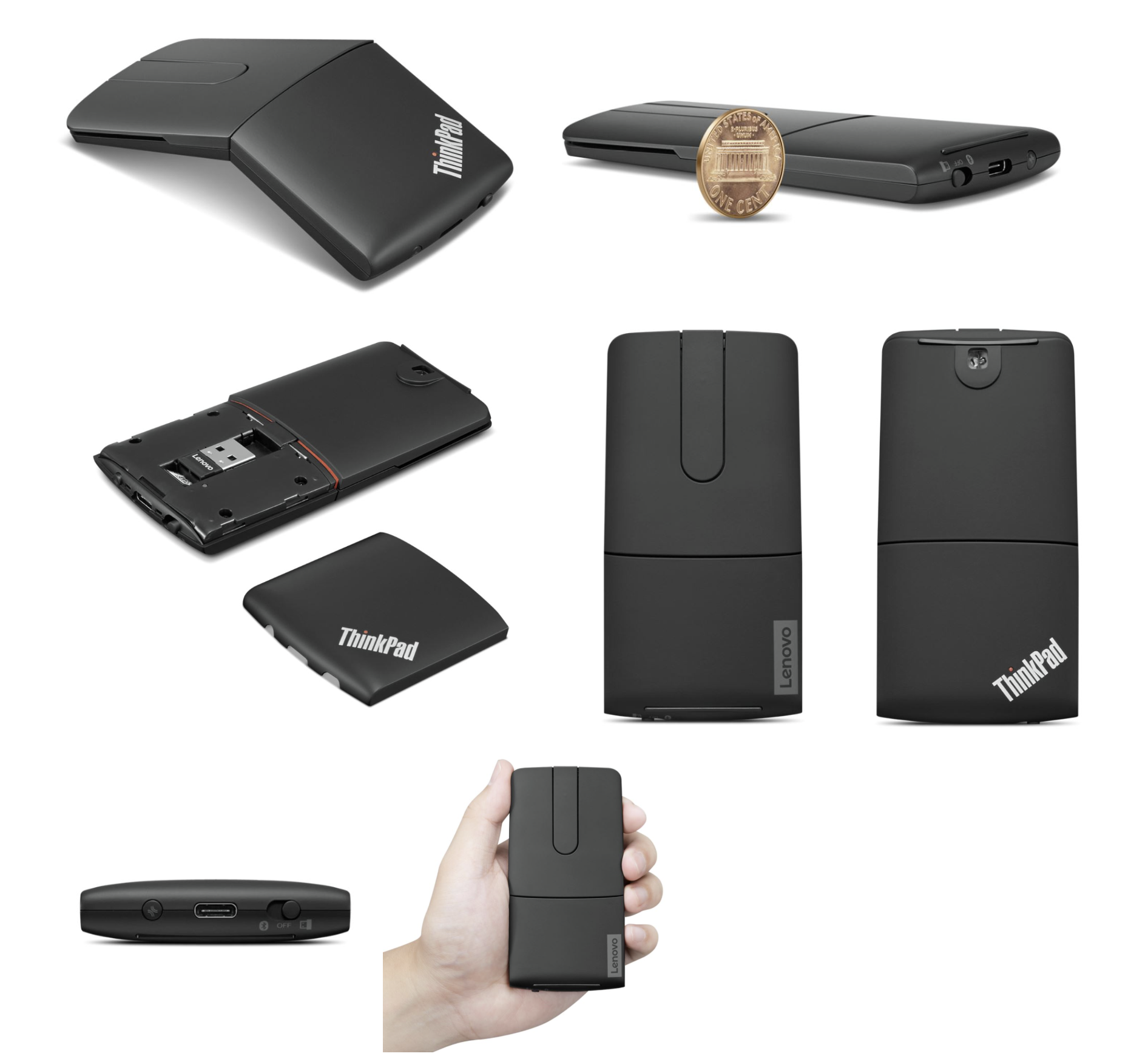
因此在GPT的帮助下搓了一个macOS版虚拟激光笔软件,原理很简单:监听到触发键按下就在指针位置显示一个红点。虽然是vibe的,但还是做了一些打磨的,除了支持X1 Presenter鼠标外,还支持自定义触发键,还可以支持其他鼠标或者飞鼠。另外也有完善的自启动和隐藏菜单栏图标功能,最小打扰。
软件源码:https://github.com/WuSiYu/x1-presenter-osx
2026-06-24 05:32:49
已经快成路边的Arduino官方去年底出的最新的UNO系列,但这次又是个高通SoC+STM32的缝合怪。先说前提:这玩意并不被社区看好,海外社区玩的人也不多,国内更是基本没有玩的。虽然大概率是赤石,不过冲着这个外观,我决定率先品鉴。
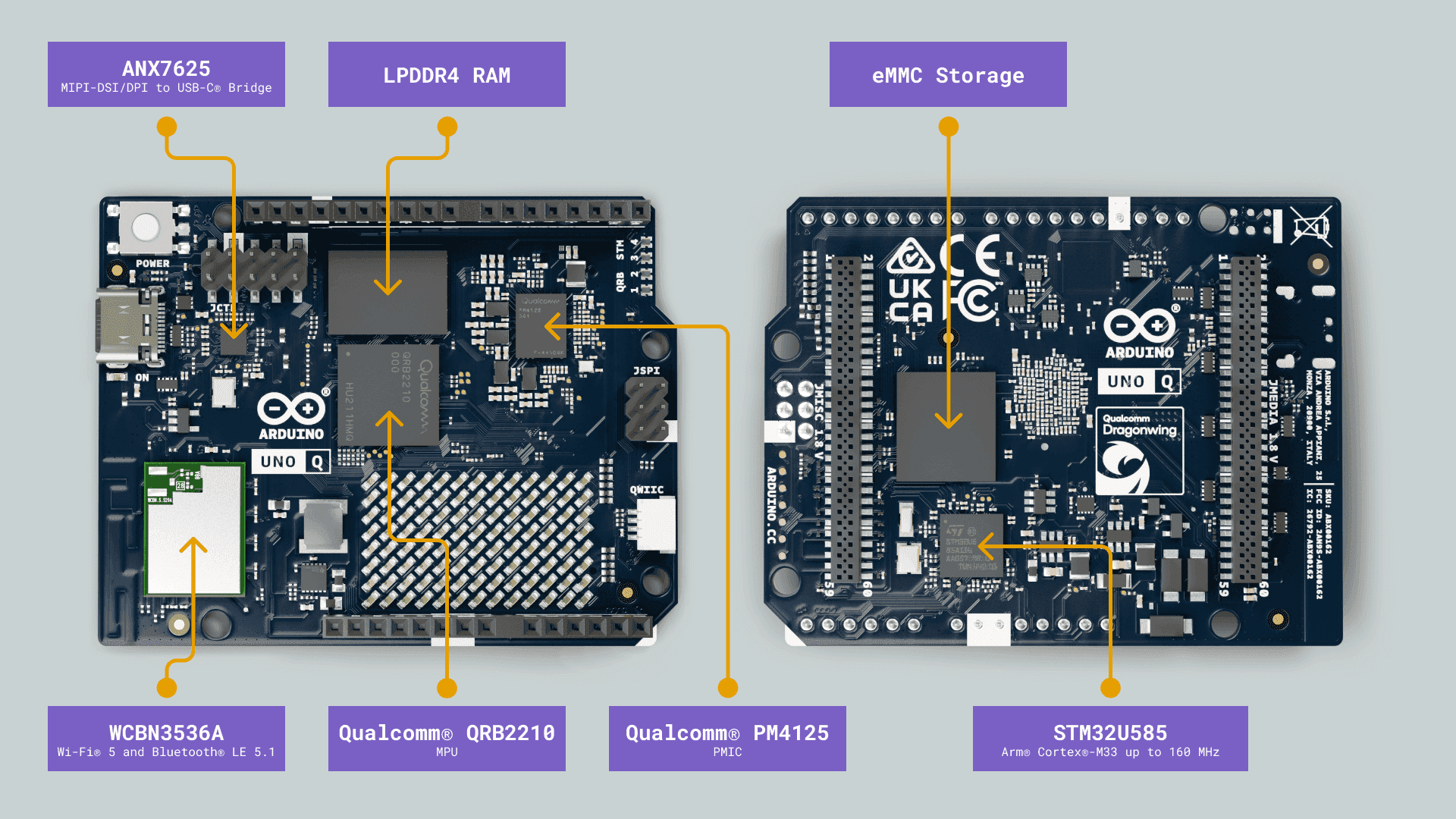
这是来自官方文档的示意图(下面的图也是),比较清晰。简单来讲,这是一个高通SoC的SBC系统和STM32的嵌入式系统二合一的开发板,全功能Type-C(含有USB3.0和DP视频输出)、内存、EMMC、WiFi/BT、背面的高密度连接器都连接到了高通SoC上;而正面的I/O口基本上都是STM32的,还有一个单色的8×13 LED阵列和IIC插座也连接在其上,具体如下图:
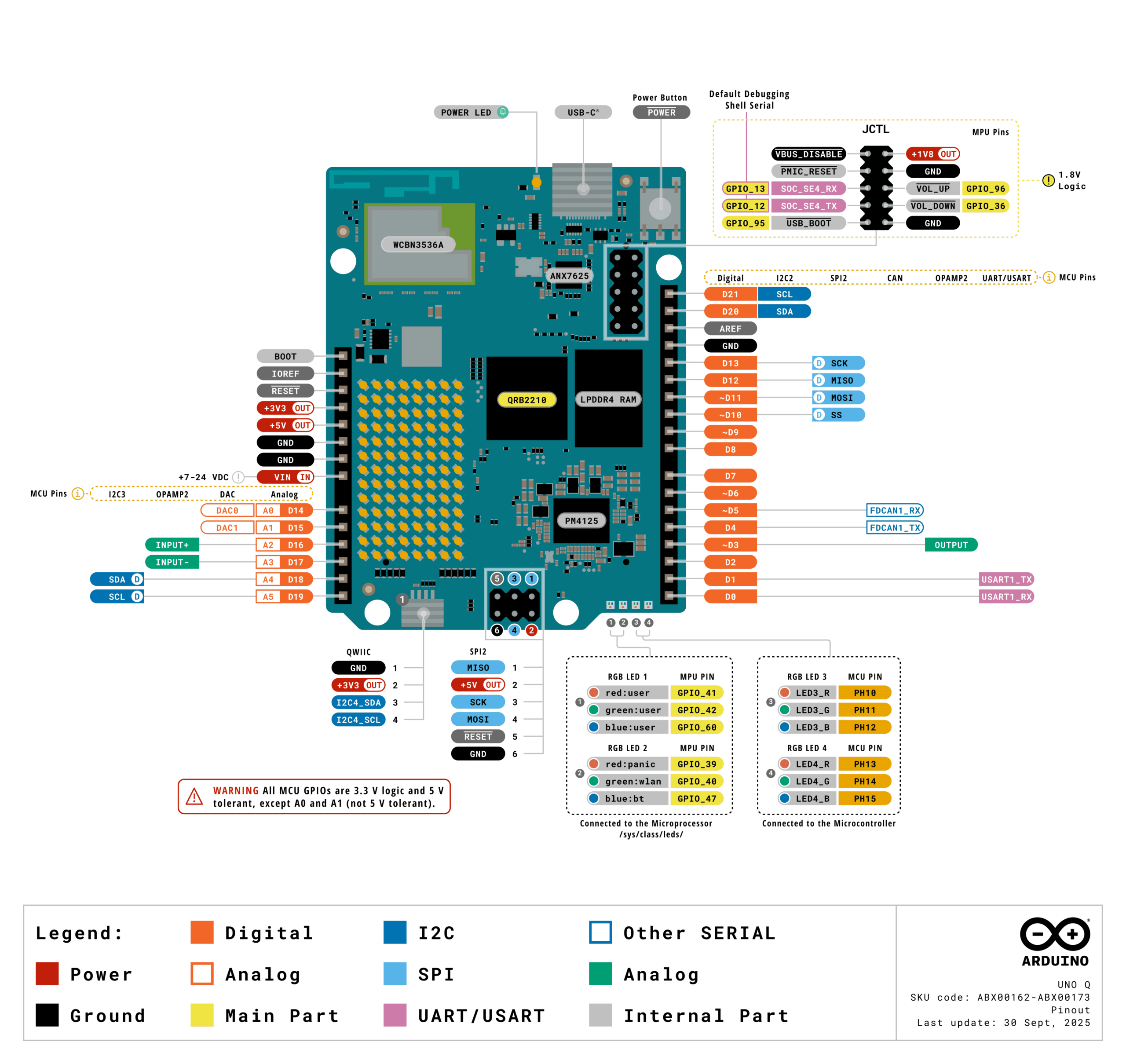
作为SBC,它的接口基本只有一个全功能Type-C,以及正面的JCTL调试接口+两个LED,其余一些接口可以从高密度连接器接入底板后引出,但目前底板很少,且国内买不到。这意味着作为SBC它需要连接外挂的全功能Type-C HUB适用,或者直接连接带HUB的显示器,插上就是一个性能有些烂的Linux小电脑。另外这个Type-C也支持OTG,可以直接连接到其他电脑上。其实就很像一个手机,对于这个高通SoC倒是意料之中。
如果只是将其当作一个SBC的话,那在2026年基本全无性价比:性能羸弱,四核A53 2.0GHz仅仅是树莓派Zero2的水平,100块以内的大量SBC都比它的CPU强。跑桌面的话2+16款会比较紧张,自带软件占用不低,4+32款倒是还凑合。接口也极为寒酸的只有一个全功能Type-C,不过如果你有带Hub的显示器那其实还挺方便的。其支持USB 3.0和DP视频输出,但整个板子的分辨率最高只能1920×1080。实际的桌面体验很一般,用起来卡卡的,估计只有倒霉蛋学生会实际用自带桌面做开发:这功能的设计目的大概就是像树莓派一样放在学生教室里,让学生直接用它自己操作自己,省一个电脑钱,至于什么4k就别想了。
要说其作为SBC的唯一优势,就是功耗比较低。这个高通SoC(QRB2210)使用了11nm LPP (Low Power Plus)制程,对比性能类似的树莓派3/Zero2的BCM2837则为古老的40nm。整板在空载时功耗0.5w,不接显示器时CPU满载 + led matrix部分点亮是功耗也只有1.5~2w。
而对于STM32系统,正面Arduino风格的I/O排插都是它的,3.3v电平,绝大多数有5v耐受。也可以通过Arduino ide上只用STM32部分,但此时SoC部分并没法关闭,会白白耗电,而且也不会有人话400多块钱就当个STM32用吧。
官方真正主推的是这个新的Arduino APP Lab中的高通SoC上的linux程序 + STM32的裸机程序的协同任务,这个新的APP Lab是全平台桌面应用,可以在Arduino UNO Q上直接运行,也可以在别的电脑上远程连接。有个自带的bridge api方便高通SoC和STM32进行通信,不过目前底层走的只是串口(LPUART1,TX、RX、RTS、CTS),默认波特率为115200,速度很挫,似乎可以改高来提速。另外还有一组SPI在电路上是相连的,但目前的bridge api功能并没有实际用上。
整个编程模型大概如下,一个App是一个目录,其中包含普通Arduino嵌入式程序,用于STM32,但增加了bridge API,其是一个RPC模块,可以调用Linux侧的函数,或者暴露函数给Linux测进行调用。而Linux测目前为python,也包含bridge API,同时Arduino APP Lab还提供了一些常用功能在python包中来方便开发,例如WebUI,天气API之类的。
官方给的一个入门小例子就是获取天气并将图标显示在板载的led matrix上显示,主要代码如下:
Linux测:
# SPDX-FileCopyrightText: Copyright (C) Arduino s.r.l. and/or its affiliated companies
#
# SPDX-License-Identifier: MPL-2.0

from arduino.app_bricks.weather_forecast import WeatherForecast
from arduino.app_utils import *

forecaster = WeatherForecast()


def get_weather_forecast(city: str) -> str:
    forecast = forecaster.get_forecast_by_city(city)
    print(f"Weather forecast for {city}: {forecast.description}")
    return forecast.category


Bridge.provide("get_weather_forecast", get_weather_forecast)

App.run()
Arduino侧:
// SPDX-FileCopyrightText: Copyright (C) Arduino s.r.l. and/or its affiliated companies
//
// SPDX-License-Identifier: MPL-2.0

#include <Arduino_LED_Matrix.h>
#include <Arduino_RouterBridge.h>

#include "weather_frames.h"

String city = "Beijing";

Arduino_LED_Matrix matrix;

void setup() {
  matrix.begin();
  matrix.clear();

  Bridge.begin();
}

void loop() {
  String weather_forecast;
  bool ok = Bridge.call("get_weather_forecast", city).result(weather_forecast);
  if (ok) {
    if (weather_forecast == "sunny") {
      matrix.loadSequence(sunny);
      playRepeat(1000);
    } else if (weather_forecast == "cloudy") {
      matrix.loadSequence(cloudy);
      playRepeat(1000);
    } else if (weather_forecast == "rainy") {
      matrix.loadSequence(rainy);
      playRepeat(2000);
    } else if (weather_forecast == "snowy") {
      matrix.loadSequence(snowy);
      playRepeat(1000);
    } else if (weather_forecast == "foggy") {
      matrix.loadSequence(foggy);
      playRepeat(500);
    }
  }
}

void playRepeat(int repeat_count) {
  for (int i = 0; i < repeat_count; i++) {
    matrix.playSequence();
  }
}
其中的bridge API用起来还挺方便的,不需要自己处理MCU和Linux通讯的各种协议和解析细节。不过有一说一,如果这只是这么一个应用,单独一个树莓派或者单独一个ESP32都能干,树莓派也有GPIO,只是难以实时控制(Linux是非实时系统),不过实际上在用纯软件驱动个LCD12864是很轻松的;至于ESP32则是没有太多的性能、资源和多媒体能力,但连个在线API还是不在话下;而真正需要Arduino UNO Q这种Linux+MCU混合设计的是一个十分狭窄的领域,例如高性能+高实时的智能机器人?而其余的恐怕90%的应用仅需要一个单一的树莓派或ESP32就足够了。
此外还有一个槽点:这玩意由于是SBC,需要安全关机,不然文件系统可能会坏。但如果你用sudo poweroff命令,它在关机后会立即再次启动。正确的方式是使用sudo halt命令,这个命令的含义是进linux系统安全关闭,但不会向硬件发送关闭电源的命令。因此它关机完成后也不会有任何指示灯的变化,你只能等几十秒觉得差不多了后再拔掉电源。
2026-06-19 01:06:24
省流:Open WebUI默认限制标题生成任务的max output token为1000,但Qwen3.5/3.6默认启用思考,且默认较长,会导致任务请求在reasoning阶段就被终止阶段,尚未产生任何有效输出,导致生成失败。最简单的修复方法是使用下方的自定义标题生成prompt来尽可能避免长思考
像网页版ChatGPT等常见的AI对话应用一样,Open WebUI也可以在新对话的首次回答后对上下文进行总结,并生成一个简短的概括的对话标题在左侧。然而接入Qwen3.5/3.6模型后这个功能就失效了,左侧不再会生成模型总结的标题,而是直接使用用户的prompt或者为”…”,这是因为标题生成失败了。
Open WebUI标题生成的逻辑在backend/open_webui/routers/tasks.py的generate_title()函数,其会向指定模型(默认为与对话中使用的相同模型)发送一个总结的请求,携带对话内容,并让模型返回{"title":"标题"}格式的输出。
代码类似:
max_tokens = models[task_model_id].get('info', {}).get('params', {}).get('max_tokens', 1000)

payload = {
    'max_tokens': max_tokens,
    ...
}

...

return await generate_chat_completion(request, form_data=payload, user=user)
然而问题出在max_token中,在默认会进行thinking的Qwen3.5/3.6中,reasoning的长度会轻松超过1000 tokens,类似如下:
{‘choices’: [{‘finish_reason’: ‘stop’, ‘index’: 0, ‘message’: {‘role’: ‘assistant’, ‘content’: ‘{“title”: “ 服务器访问日志解析”}’, ‘reasoning_content’: ‘Here\’s a thinking process:\n\n1. **Analyze User Input:**\n – **Task:** Generate a concise, 3-5 word title with an emoji summarizing the chat history.\n – **Guidelines:**\n – Clearly represent main theme/subject.\n – Use relevant emoji, no quotes/special formatting.\n – Language: Chat\’s primary language (Chinese in this case).\n – Prioritize accuracy, keep it clear/simple.\n – Output MUST be a single, raw JSON object only.\n – Format: `{“title”: “your concise title here”}`\n – **Chat History:**\n – User asks to analyze a log line: `127.0.0.1 – “GET /api/targets/300e7f6666584384bcef8895fe038147/measurements?limit=200000&since=1781530087.438 HTTP/1.1” 200 -`\n – Assistant breaks it down: identifies it as a Web server/access log, explains IP, HTTP method/path, parameters (MongoDB ID, limit, timestamp), status code, log format, and business context (monitoring/IoT/time-series DB).\n – Language: Chinese.\n – Main theme: Web server log analysis / HTTP request log breakdown.\n\n2. **Determine Title Requirements:**\n – 3-5 words (in Chinese, this usually means 3-5 Chinese characters or words/phrases, but I\’ll aim for a concise phrase that fits the spirit).\n – Include an emoji.\n – Language: Chinese.\n – Format: JSON only.\n\n Let\’s brainstorm titles in Chinese:\n – 服务器访问日志分析 (Web server access log analysis) – 6 chars + emoji. Good.\n –
  HTTP请求日志解析 (HTTP request log parsing) – 6 chars + emoji. Good.\n –
  访问日志详细解读 (Access log detailed interpretation) – 6 chars + emoji.\n –
  Web日志分析指南 (Web log analysis guide) – 5 chars + emoji.\n –
  服务器日志拆解 (Server log breakdown) – 5 chars + emoji.\n – 访问日志逐段解析 (Access log segment-by-segment parsing) – 6 chars + emoji.\n – Let\’s count “words” in Chinese context: usually 2-4 characters make a concept. The prompt says “3-5 word title”. I\’ll aim for 3-5 Chinese words/characters that form a coherent short title.\n – “ 服务器日志解析” (Server Log Analysis) – 4 chars + emoji. Fits well.\n – “ Web访问日志分析” (Web Access Log Analysis) – 5 chars + emoji.\n – “ HTTP日志详细解读” (HTTP Log Detailed Analysis)\n – Let\’s stick to the core: It\’s about analyzing a web/server access log.\n – “ 服务器访问日志分析” (6 chars) -> maybe trim to “ 服务器日志分析” (5 chars)\n – Actually, the prompt says “3-5 word title”. In Chinese, words are often 2 characters. So 3-5 words = 6-10 characters, but I\’ll keep it short and natural. I\’ll go with “ Web访问日志解析” (Web Access Log Parsing) or “ 服务器日志分析”.\n – Let\’s count: “ 服务器日志分析” -> 5 Chinese characters. Fits the spirit.\n – Another option: “ HTTP请求日志解析” (HTTP Request Log Parsing)\n – I\’ll use: “ 服务器访问日志解析” (Server Access Log Parsing) – 7 chars. Maybe too long? The prompt says 3-5 words. I\’ll interpret “words” loosely as a short phrase. I\’ll stick to “ 服务器日志分析” (5 chars). Or “ 访问日志详细解读” (6 chars).\n – Let\’s look at the examples: “
 Stock Market Trends” (3 words), “
 Perfect Chocolate Chip Recipe” (4 words). So in Chinese, 3-5 words/phrases like “服务器访问日志分析” (Server Access Log Analysis) works.\n – I will generate: `{“title”: “ 服务器访问日志解析”}`\n – Check constraints: 3-5 words? “服务器 访问 日志 解析” is 4 words. Fits.\n – Emoji: (fits analysis)\n – Language: Chinese\n – JSON only: Yes.\n\n Let\’s refine to strictly match “3-5 words” in Chinese context: “ Web访问日志分析” (4 words: Web 访问 日志 分析) or “ HTTP请求日志解析”. I\’ll go with “ 服务器访问日志解析”.\n Actually, the prompt says “3-5 word title”. I\’ll make it exactly 4 Chinese words: “ 服务器日志分析指南” (5 chars) -> maybe “ Web日志详细解析” (4 chars).\n I\’ll stick with “ 服务器访问日志解析”. It\’s clear and accurate.\n Wait, let\’s count words in English equivalent to be safe: “Server Access Log Analysis” = 4 words.\n I will output exactly: `{“title”: “ 服务器访问日志解析”}`\n\n Double check constraints:\n – Concise, 3-5 word title with emoji:
  \n – Clearly represents main theme: (Analyzing a server access log)\n – No quotes/special formatting in title: \n – Primary language: Chinese \n – JSON only, raw: \n\n One minor adjustment: The prompt says “3-5 word title”. In Chinese, character count often matters more. I\’ll use “ Web访问日志解析” (4 concepts/words). Or “ 服务器日志分析”. I\’ll go with “ 服务器访问日志解析”. It\’s fine.\n Actually, I\’ll make it exactly 4 Chinese words: “ 访问日志详细解析”\n Let\’s just use “ 服务器日志分析” (3 words: 服务器 日志 分析). Fits 3-5.\n I\’ll output `{“title”: “ 服务器日志分析”}`.\n Wait, the chat is specifically about breaking down an HTTP access log line. “ HTTP访问日志解析” might be better.\n I\’ll stick with `{“title”: “ 服务器访问日志解析”}`. It\’s standard.\n All constraints met. Output matches requirement.\n Proceed. \n Self-Correction/Verification during thought:\n – Check word count: “服务器访问日志解析” is 7 characters. In Chinese, a “word” (词) is usually 2 characters. So it\’s ~3.5 words. Acceptable.\n – The prompt examples are in English. I will follow the language rule: “Write the title in the chat\’s primary language”. Chat is Chinese.\n – I will generate exactly the JSON.\n – Final: `{“title”: “ 服务器访问日志解析”}` matches all criteria. \n – Output matches exactly.\n – Proceeds. \n – Output Generation. \n – `{“title”: “ 服务器访问日志解析”}` -> Wait, let\’s count words in Chinese: 服务器(1) 访问(2) 日志(3) 解析(4). Exactly 4 words. Perfect.\n – Ready. \n – Output matches request.\n – Final Check of the prompt: “Your entire response must consist solely of the JSON object, without any introductory or concluding text.” -> I will output just the JSON string.\n – All good. \n – Output Generation. \n – `{“title”: “ 服务器访问日志解析”}`\n – Done. \n – [Self-Correction/Refinement during thought] \n – I\’ll make sure it\’s strictly 3-5 words as requested. “ 服务器日志分析” (3 words) is safer. Or “ HTTP请求日志解析” (4 words). I\’ll stick with “ 服务器访问日志解析”. It\’s fine. The prompt says “3-5 word title”, which is a guideline for English typically, but I\’ll adapt to Chinese naturally. \n – I will output exactly: `{“title”: “ 服务器访问日志解析”}`. \n – Proceeds. \n – [Output Generation] -> `{“title”: “ 服务器访问日志解析”}` (matches all constraints) \n – Done. \n – *Self-Correction/Note during generation prep*: I should ensure the JSON is raw and unformatted as per instruction. The prompt says “single, raw JSON object”. I will output exactly that.\n – Final string: `{“title”: “ 服务器访问日志解析”}`\n – All good. \n – Output matches.\n – Proceeds. \n – [Final Output Generation] (matches the response)\n – `{“title”: “ 服务器访问日志解析”}`\n – Done. \n – *(Note: I\’ll double check the exact wording to be safe. “ Web访问日志分析” might be slightly better, but either is fine. I\’ll stick with the first.)*\n – Output matches request.\n – Proceeds. \n – [Final Check of the Prompt]: “3-5 word title”. In Chinese, 服务器访问日志解析 is 4 words. Perfect.\n – Output: `{“title”: “ 服务器访问日志解析”}`\n – Done. \n – [Output Generation] (Proceeds)\n’}}], ‘created’: 1781800255, ‘model’: ‘qwen3.6-27b’, ‘system_fingerprint’: ‘b9692-f3e182816’, ‘object’: ‘chat.completion’, ‘usage’: {‘completion_tokens’: 2244, ‘prompt_tokens’: 1371, ‘total_tokens’: 3615, ‘prompt_tokens_details’: {‘cached_tokens’: 0}}, ‘id’: ‘chatcmpl-1gc3p7kSIilLugs3fjo8agNekjLJ0YWj’, ‘timings’: {‘cache_n’: 0, ‘prompt_n’: 1371, ‘prompt_ms’: 632.249, ‘prompt_per_token_ms’: 0.46115900802334064, ‘prompt_per_second’: 2168.449455831484, ‘predicted_n’: 2244, ‘predicted_ms’: 23955.501, ‘predicted_per_token_ms’: 10.675356951871658, ‘predicted_per_second’: 93.67368271696759, ‘draft_n’: 2190, ‘draft_n_accepted’: 1513}}
导致请求提前终止,此时模型多半还在斟酌标题,Open WebUI无法在这些内容中找到任何有效的JSON结构。
而更抽象的是,前面这个models[task_model_id].get('info', {}).get('params', {}).get('max_tokens', 1000)也是没有意义的,较新的Open WebUI中这个.info.params这个字段会被去除,因此max_tokens会恒等于1000,无法进行设置。
目前的可能的几种修复方案如下(部分并不可行),最简单的就是开头提到的第一个:
方法1. 在设置中自定义title生成任务的prompt模板,勒令模型减少reasoning长度
这种方式无需修改代码,但这不是一个强的约束,模型不一定会遵守,大部分时候可用,但有时仍会失败。
进入管理员面板 -> 设置 -> 界面,在“用于自动生成标题的提示词”中填入以下内容:
根据下面的对话生成简短标题。

严格只输出一行合法 JSON:
{"title":"标题"}

重要:极大降低思考强度,不需要总结和反复斟酌,立刻产生标题并结束思考,不要进行Constraints check/Self-Correction/Refinement,避免超出输出限制导致失败!

对话:
{{MESSAGES:END:2}}
这里移除了开头emoji的生成,因为这种复杂性更容易让reasoning超过1000 tokens。
方法2. 修改Open WebUI代码,修正max_tokens获取
对max_tokens行做替换,进行如下修改:
from open_webui.models.models import Models

model_info = await Models.get_model_by_id(task_model_id)
model_params = (
    model_info.params.model_dump()
    if model_info and model_info.params
    else {}
)
max_tokens = model_params.get("max_tokens", 1000)然后模型设置(管理员面板-设置-模型 或 侧边栏-工作空间-模型) -> 高级参数 -> max_tokens,填写一个较大的数。注意这也会对你的普通对话生效,可以直接拉到最大。
当然你也可以直接将代码里的1000改的更大,例如4096一般就足够了。
这个修订我正在向Open WebUI发起PR。
方法3. 禁用title生成任务的thinking
可惜,Qwen3.5/3.6不再支持/no_think,只支持在请求中使用"chat_template_kwargs": {"enable_thinking": false},Open WebUI中一直没有便捷的方法。
一种暴力的方法就是修改上述payload代码,加入这个chat_template_kwargs字段,但这可能会破坏其他模型/后端的支持,是一个dirty fix。
另外如果你在Open WebUI通过自定义函数(filter)的方式来动态关闭thinking,对title生成任务是无效的,因为其不会加载任何集成和过滤器。
2026-06-16 02:50:11
自从上了NodeSeek,家里就只有VPS了,最近在尝试新的代理和建站VPS,一来二去买了快10台了,趁着没过期,这里集中记录一下全天的ping统计和线路情况,更多信息可以去NodeSeek搜索相应的NQ脚本结果,这里就不贴了。
测试地点为北京联通家宽(AS4808),普通套餐,套餐较早,有公网IP,没有买9929优化包,多次提速后目前为千兆下行速率
下面直接上图,以下为天级别的ping统计,间隔为1s,因此丢包多少个大概就能对应有多少秒是中断的。注意不同机器的检测时长不同,注意观察第一个子图的横坐标,是小时为单位的时间。
绿云是一家越南的VPS服务商,主打性价比,工单回复很快。但似乎技术水平一般,有时会自己搞出故障来,机器限制也较多,例如据说CPU长期超过30%后不是给你限速,而是直接关机。
中国优化系列是一个不便宜的高端系列,有日本和新加坡地区可选。线路上游是xTom gen2,顶级线路之一,正价都是$25/月,500Mbps/500G,算是高端档次机器中不那么贵的。一般认为是更贵的V.PS(xTom的直接子公司)gen2优化机型的平替,线路是完全一样的,只是流量更少些。
#1 日本东京:CN Premium Optimized – CN Premium Optimized Plan Mini (Tokyo)
正价$25/月,1cpu / 2G / 20GB,500Mbps端口,每月流量500G双向计费
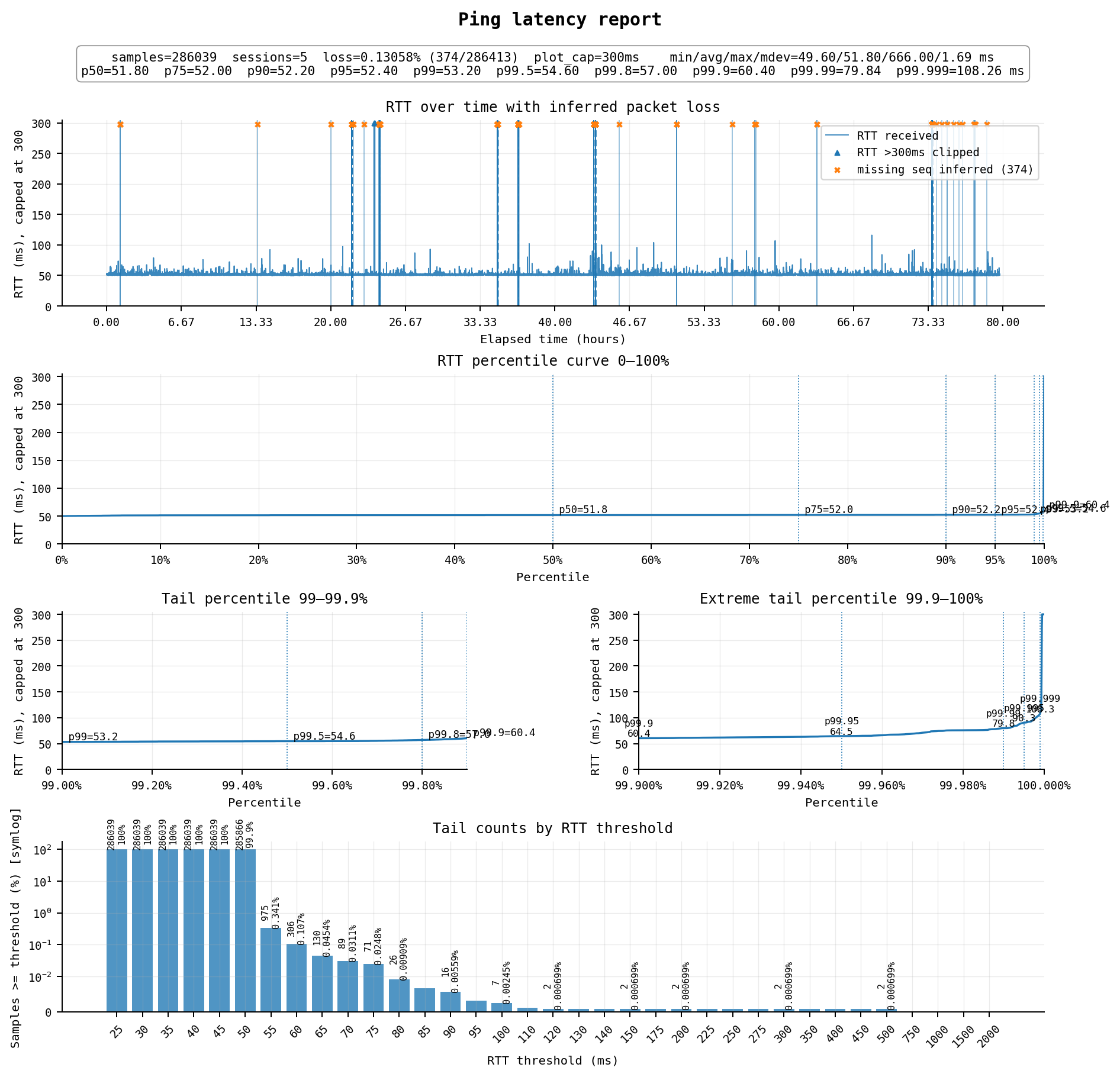
顶尖水平,延迟52ms,周五~周日连续3天中丢包0.13%,延迟略高的0.1%左右,可用率约99.8%,对于日本线路来说很稳了,不过在一天中仍然可能有一两次会有几十秒的断流。
线路方面:
去程为 AS4808 北京联通 → AS4837 → AS9929 → AS10099 → AS3258 xTom JP
回程为 AS3258 xTom JP → AS10099 → AS9929 → AS4837 → AS4808 北京联通
双向均为联通精品网(9929/10099),直接连到xTom gen2线路,这是目前亚太地区的顶级线路之一
#2 新加坡:CN Premium Optimized – CN Premium Optimized Plan Mini (Singapore)
正价同样是$25/月,1cpu / 2G / 20GB,500Mbps端口,每月流量500G双向计费
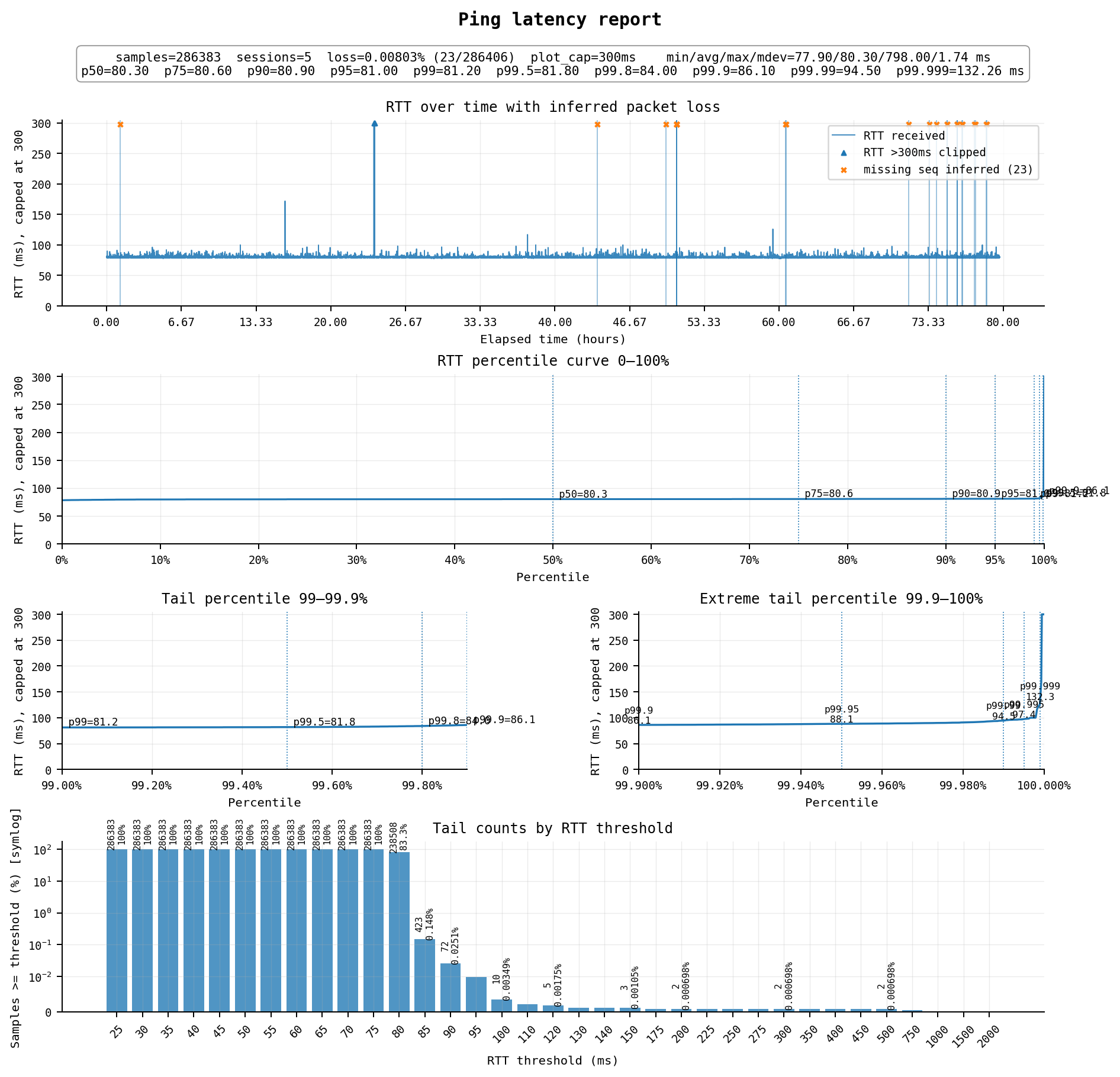
稳定性真正的顶尖,新加坡由于距离稍远,延迟来到了80ms,但丢包不到0.01%,高延迟约0.02%,可用率达到了约99.97%,这意味着你大概率完全感受不到任何中断。
线路方面(与上一台类似):
去程为 AS4808 北京联通 → AS4837 → AS9929 → AS10099 → AS8888 xTom
回程为 AS8888 xTom → AS10099 → AS9929 → AS4837 → AS4808 北京联通
双向均为联通精品网(9929/10099),另外xTom AS8888这数字很吉利,一眼国人搞的
SiliCloud是一家小商家,但因为一些机缘巧合我用的比较久。这家的优点是便宜和配置比较灵活,每台机器都可以随意自定义配置和硬盘大小,对于代理用途可以把cpu/内存/硬盘都拉到最小,还能省一笔钱。缺点就是线路一般,但在这价格下也是正常水平。
#3 日本东京:TYO-JP-1 国际流量
标准配置$5.42/月,1cpu / 2G / 30G,500Mbps端口 / 每月流量500G单向计费(只有出口流量计入)
不带“混cn2”国内优化的国际流量,前几年算是“联通快乐机”,但现在劣化严重,很不稳定
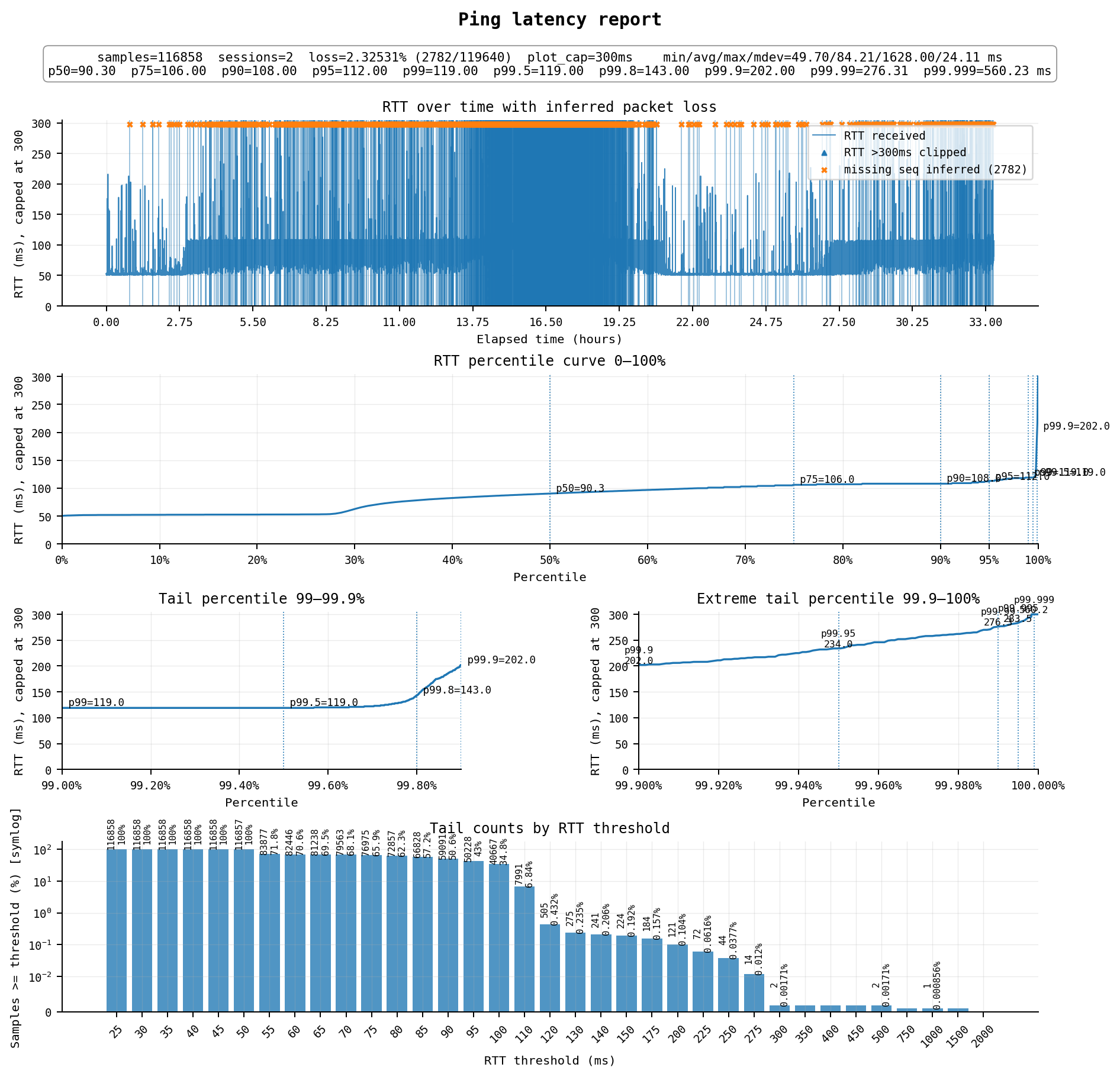
非常惨烈,不抽风的平峰期延迟能到52ms左右,但只有零晨到早上几个小时。高峰期非常炸裂,丢包非常惨烈,尤其是晚高峰那几个小时,并且延迟会大幅抖动升高到100ms以上。
线路方面:
去程为 AS4808 北京联通 → AS4837 → AS17676 软银 → AS149042 Silicon Cloud
回程为 AS149042 Silicon Cloud → AS17676 软银 → AS4837 → AS4808 北京联通
经典的软银线路,去程和回程均为普通的联通CU169(AS4837)线路,近年来日本普通线路与国内的质量持续劣化,高峰期基本都是惨不忍睹的情况
#4 日本东京:TYO-JP-1 国际混cn2流量
标准配置$8.416/月,1cpu / 2G / 30G,500Mbps端口 / 每月流量500G单向计费
这款被描述为“国际混cn2”流量,价格稍贵,如果不出问题的话延迟稳定优秀,但不知道是不是个例,我这个稳定性极差,实际体验比普通版还差
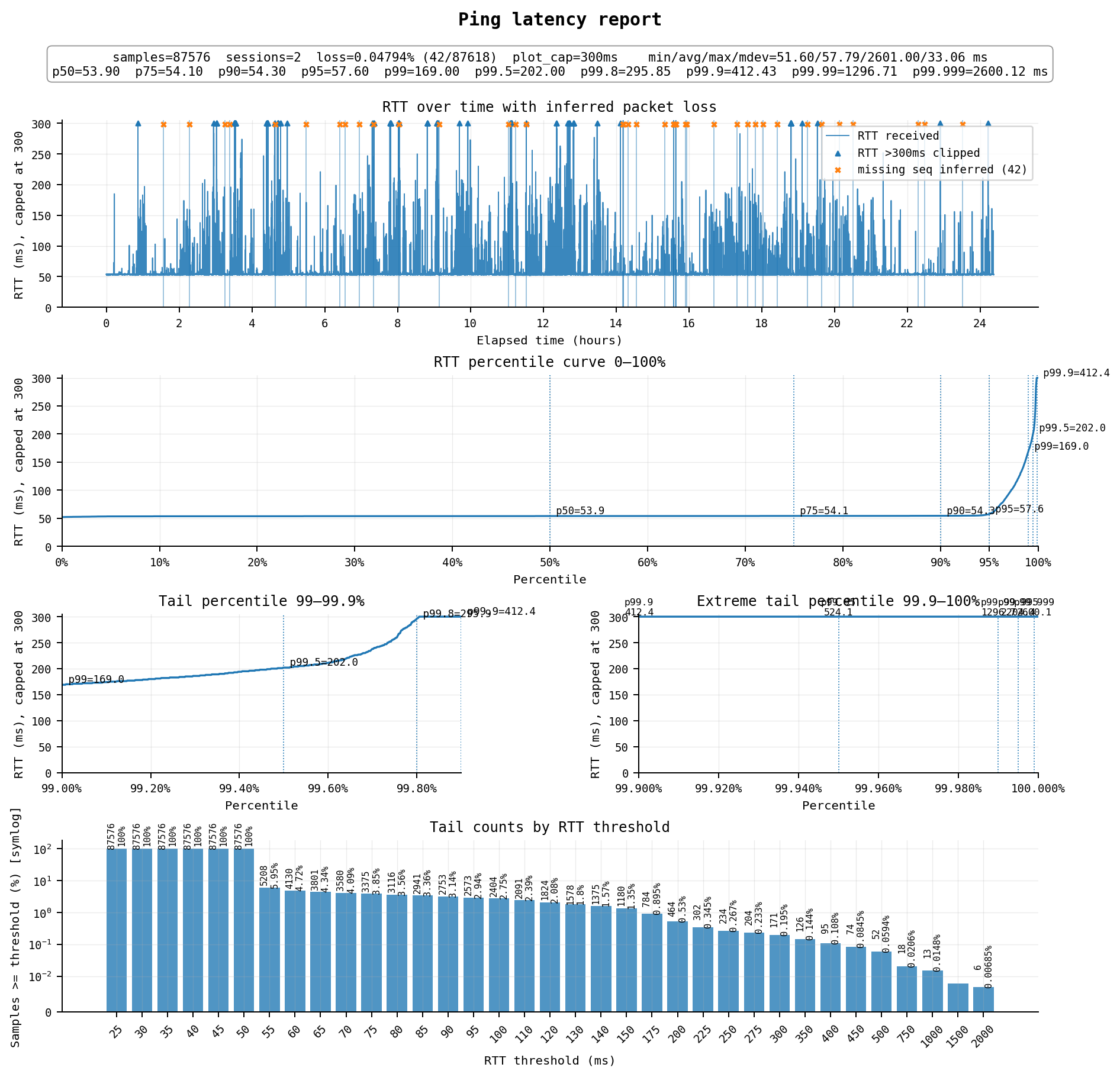
如果只是看指标,平均延迟58ms,丢包率0.05%,似乎很不错?但实际上从全天ping图中就能看到端倪,ping尾延迟极高,足足有5%左右的包都有异常偏高的延迟。
具体表现为每隔一段时间就会有一个ping尖峰伴随丢包,很像是链路突然阻塞了几秒到几十秒中,然后才恢复,buffer中的一些包被收到,得到了巨大的延迟,另一些包则被丢弃。在这几秒到几十秒中网络是不可用的,这意味着你上网时会经常卡死十几秒不可用,实际体验还不如普通版。
线路方面:
去程为 AS4808 北京联通 → AS4837 → AS9929 → AS10099 → AS21859 Zenlayer → AS149042 Silicon Cloud
回程为 AS149042 Silicon Cloud → AS21859 Zenlayer → AS10099 → AS9929 → AS4837 → AS4808 北京联通
去程和回程都是经过Zenlayer连接到联通精品网(AS9929/AS10099),看似很美好,但稳定性问题使其实用价值很低
#5 美国洛杉矶:LAX-CA-US-1 国际流量
标准配置$5.42/月,1cpu / 2G / 30G,1000Mbps端口 / 每月流量1000G单向计费
降配置后$26.66/年付(-16%),1cpu / 0.5G / 10G hdd,性价比还可以
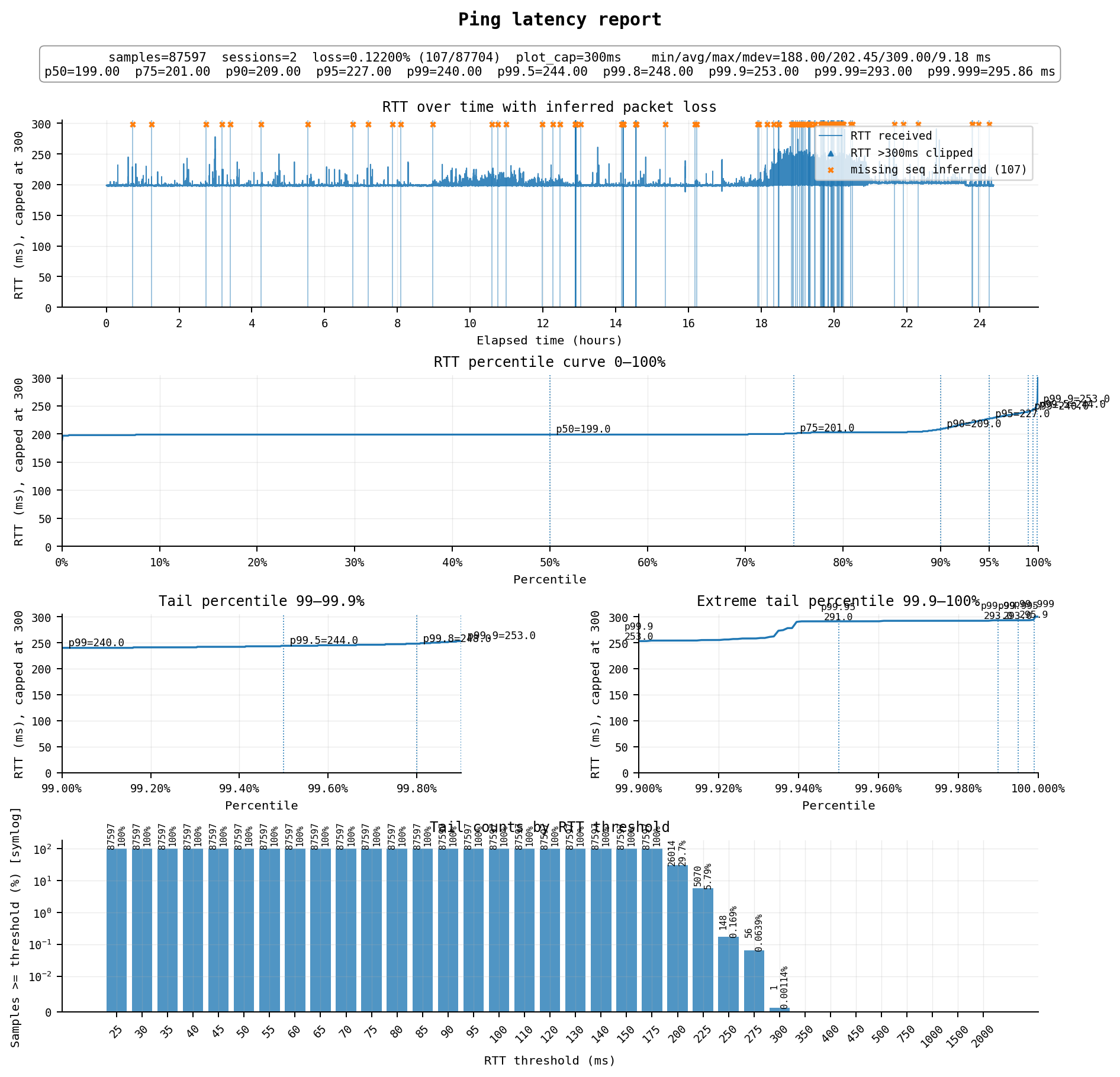
虽然是“国际流量”,但我这里丢包率还可以,延迟202ms,属于一般水平,但他家的美国“国际混cn2mix”在我这里延迟也是200ms左右,可能也就丢包率低一点。美国节点我只是作为备用机,因此这个水平也还可以了。不过如果只是美国的话其实这个价格下类似或更高质量的机器也不少。
线路方面:
去程为 AS4808 北京联通 → AS4837 → AS149042 Silicon Cloud
回程为 AS149042 Silicon Cloud → AS21859 Zenlayer → AS4837 → AS4808 北京联通
去程和回程均为普通的联通CU169(AS4837)线路,VPS出口先经过Zenlayer
#6 中国香港:香港云-优化网络 HK-VP04
标准配置$5/月,1cpu / 1G / 50G,网络可选 20Mbps端口+1000G 或 10Mbps不限流量
另有优惠款HK-VP02,$25/年付,但只有10Mbps不限流量可选
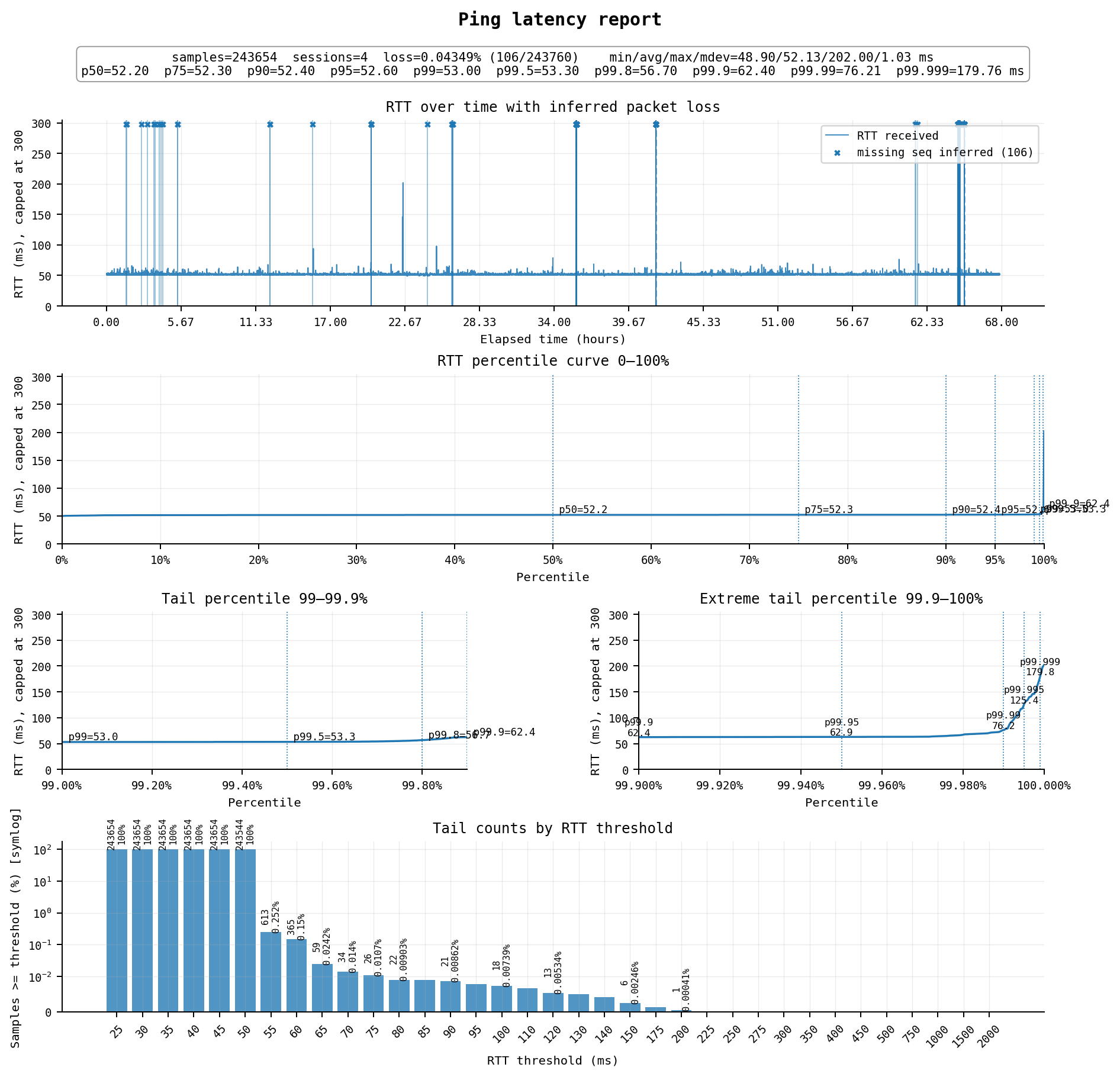
线路是相当精品的香港优化线路,延迟52ms,丢包率0.04%,高延迟0.02%,可用率能有99.94%,高峰期稳定。不过带宽仅有20Mbps或10Mbps,看视频和下载会很不好用,不一定适合代理,但很适合建站。
每个月加$1.2可以升级到2cpu+2G,目前(2026/06)本站就运行在这台机器上。不过有两个雷点1.无IPv6,2.硬盘虽然标称SSD,但4k随机读写较差,仅有3MB/s,U盘水平
线路方面:
去程为 AS4808 北京联通 → AS4837 → AS10099 → AS54801 Zillion Network → AS139646 Megalayer
回程为 AS139646 Megalayer → AS10099 → AS4837 → AS4808 北京联通
去程和回程都经过联通海外精品网(10099)中转,进入中国大陆后直接走的是AS4837普通联通169骨干网,并未再接入 AS9929,但不超售(大概)的AS4837高峰期依然很稳定。Megalayer是一家香港主机商(LightLayer),通过Zillion Network(AS54801)上联到CommuniLink联通国际(10099)
#7 新加坡:AWS Lightsail 新加坡,区域 A(ap-southeast-1a)
正价$5/月,2cpu(平均可用5%)/ 0.5G / 20G,不限速端口 / 1000G流量
正价$7/月,2cpu(平均可用10%)/ 1G / 40G,不限速端口 / 2000G流量
正价$12/月,2cpu(平均可用20%)/ 2G / 60G,不限速端口 / 3000G流量
AWS绑卡注册后会送$100有效期一年的credit,以及Lightsail自身还免费3个月,也就是可以最多可以免费玩一年$12/月的
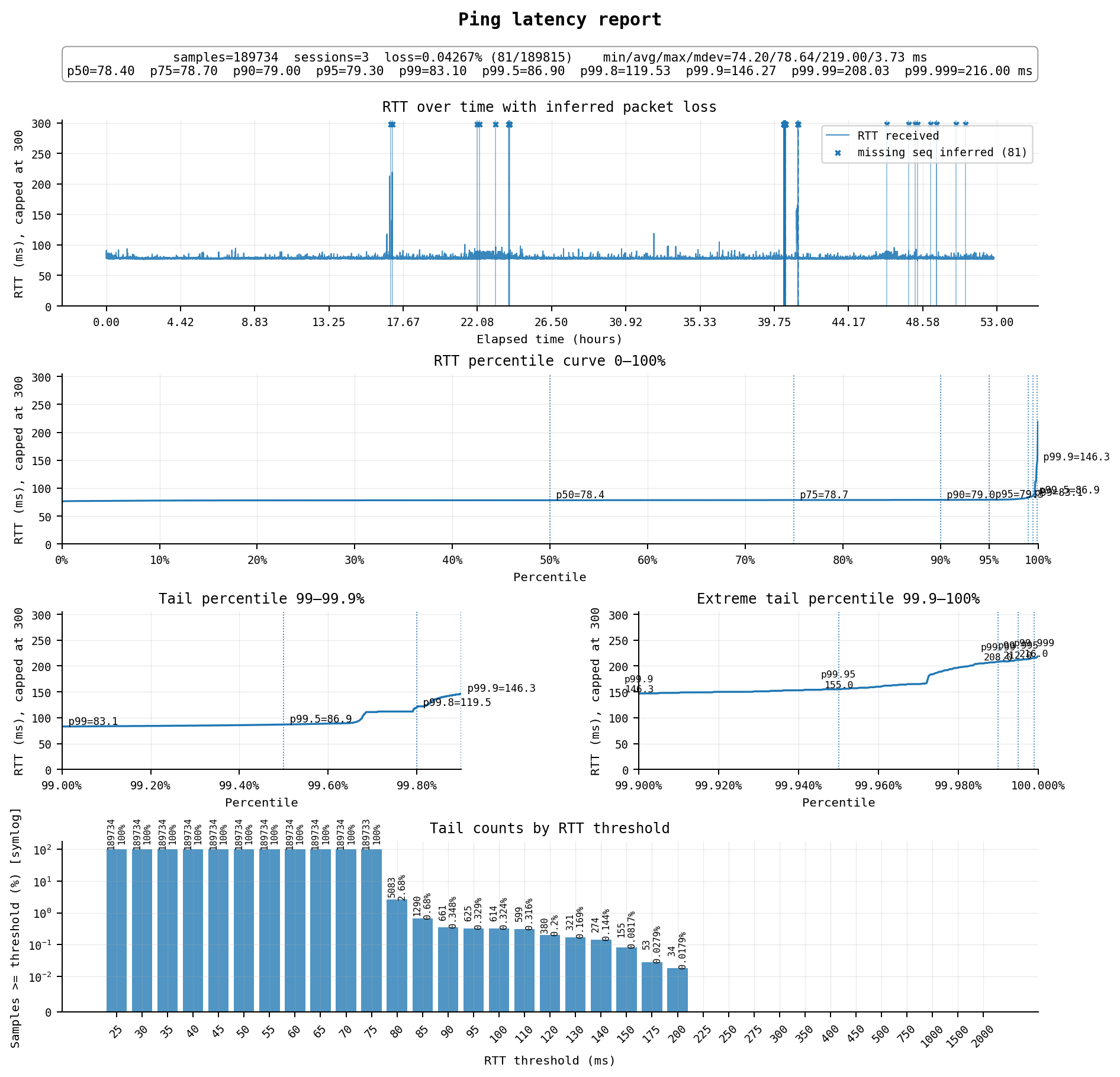
AWS新加坡线路似乎是其亚太多个区域最稳的路线,延迟79ms,丢包0.04%,高延迟0.35%,可用率月99.6%,看上是无论代理还是建站的好机器。不过毕竟是免费的,门槛低,长期稳定性有待观察
线路情况:
去程为 AS4808 北京联通 → AS4837 → AS16509 Amazon AWS 内网
回程为 AS16509 Amazon AWS 内网 → AS4837 → AS4808 北京联通
双向并没有优化线路,但高峰期缺很稳。根据一些说法,如果AS4837签的带宽非常充足,那也是非常可用的(甚至可能比总容量不高的9929的鲁棒性更高),AWS SG大概就是这种情况
#8 日本东京:JP 2 China Optimization Network JP2-CO-Micro
$6.84/月(使用优惠码“我是高手我不需要发工单”,没错真叫这个),1cpu / 0.5G / 10G,流量1000G双向计费
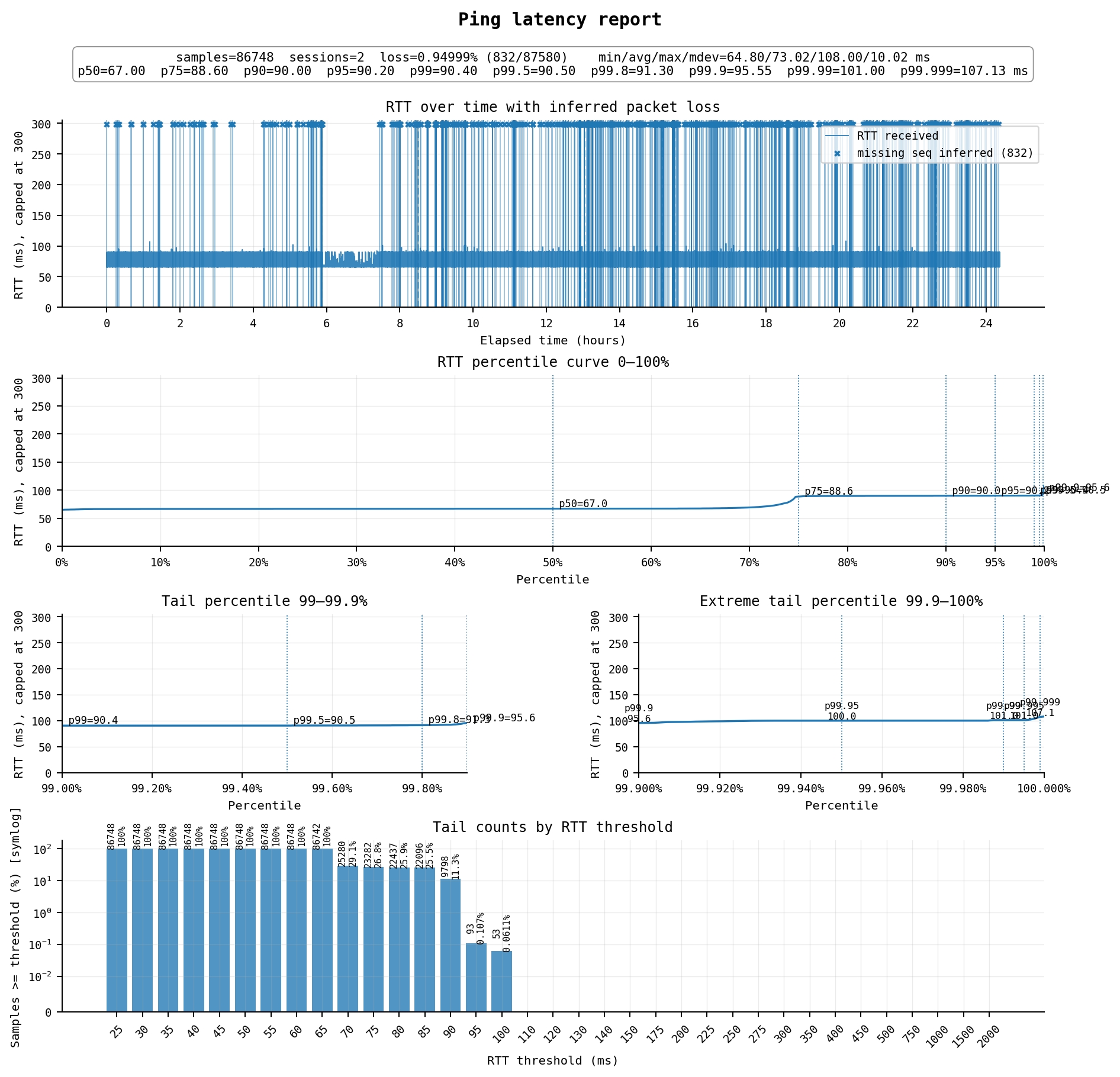
虽然价格不贵,但线路也不算特别好,延迟平均73ms,不稳定,在67ms和90ms之间跳,丢包不算少,算是这个价位不好不坏的水平。但论坛里有人说高峰期跑不上速度,因此还是谨慎购买。
线路方面:
去程为 AS4808 北京联通 → AS4837 → AS2914 NTT → AS400618 Prime Security
回程为 AS400618 Prime Security → AS140042 iZEC 志品商 → AS4837 → AS4808 北京联通
算是NTT线路,去程从联通 4837 骨干交给 NTT(AS2914,日本 Tier1),NTT 再送到 Prime Security;回程则通过 iZEC 志品商(AS140042,香港中转商)直接接入 4837 回国。两个方向都没有走 9929 精品网。Prime Security(AS400618)是一家小型日本 VPS 商,上游通过 iZEC 获得中国联通连接,但 iZEC 只对接了 4837 普通骨干
#9 日本东京:普通最低配VPS
$5/月,1 cpu / 1G / 25G,1000G流量
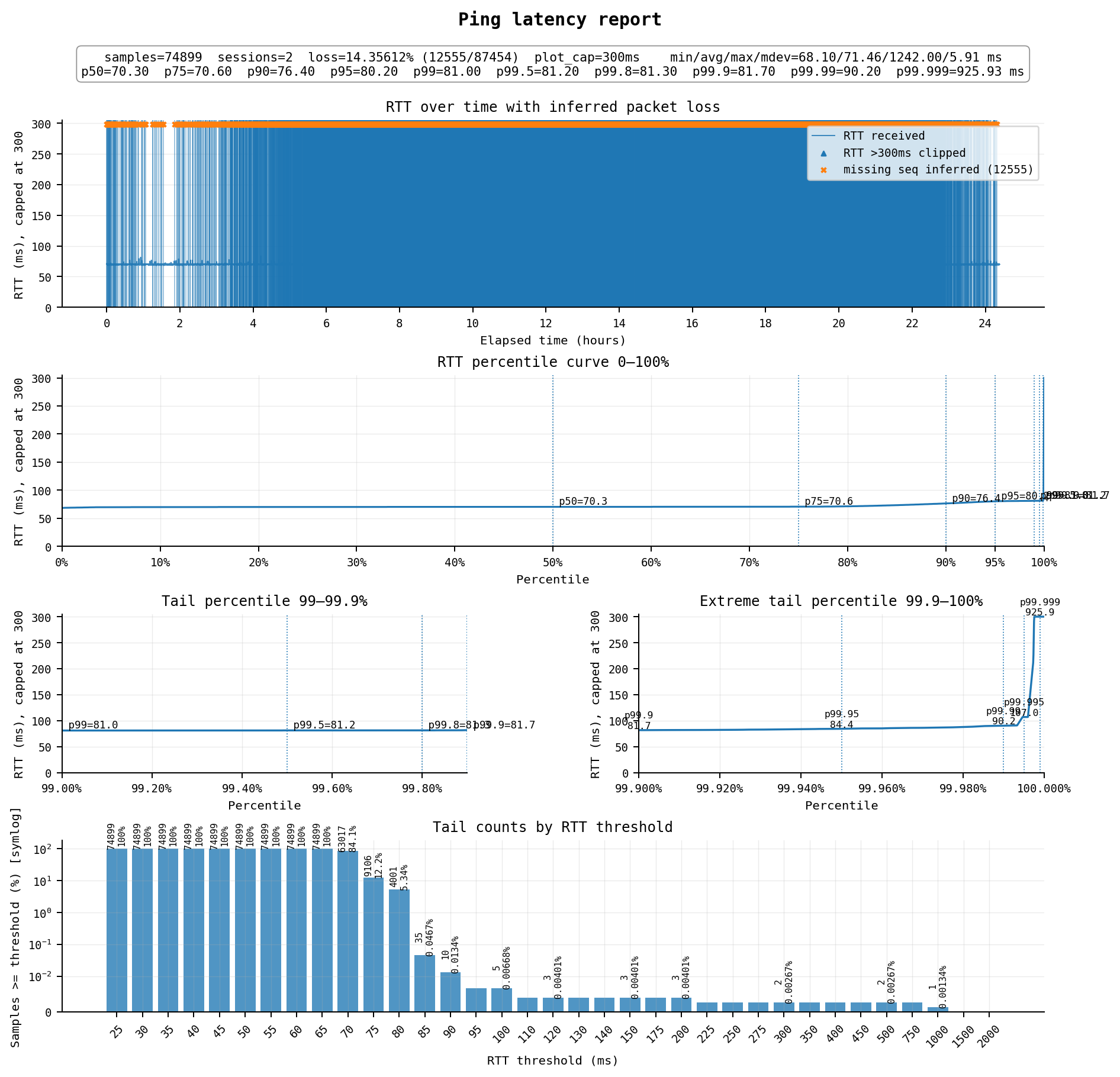
可以说是非常惨烈了,延迟71ms左右,但全天丢包居然能达到14%+,高峰期更是能把图变成实心的。这台VPS开了大概有6年,在之前的时间一直承载本站,当年还是尚可的线路,但如今已经极为拉胯
线路方面:
去程为 AS4808 北京联通 → AS4837 → AS2914 NTT → AS20473 Vultr
回程为 AS20473 Vultr → AS2914 NTT → AS4837 → AS4808 北京联通
去程和回程双向都经过 NTT(AS2914),这是 Vultr 日本节点的默认上游。NTT 在东京与联通 4837 骨干对接,没有走 9929 精品网。这是 Vultr 的标准路由,没有针对中国做优化。可见4837之间亦有差别,而这个是最炸裂的
世界加钱可及?若干 AWS / GreenCloud / Lightlayer / RFCHOST / SiliCloud / Vultr 的日本/新加坡/香港/美国VPS全天ping测试最先出现在WuSiYu Blog。
2026-06-10 03:21:32
众所周知买UniFi一半的价钱是为了这张拓扑图。。。但前提是你得买官方的AP和死贵的交换机(同样的RTL9303螃蟹芯片8口万兆光,杂牌只要¥400、TP-Link的卖¥800、而UniFi USW Aggregation能卖¥2400),不然通常所有设备就只会挤成一行。
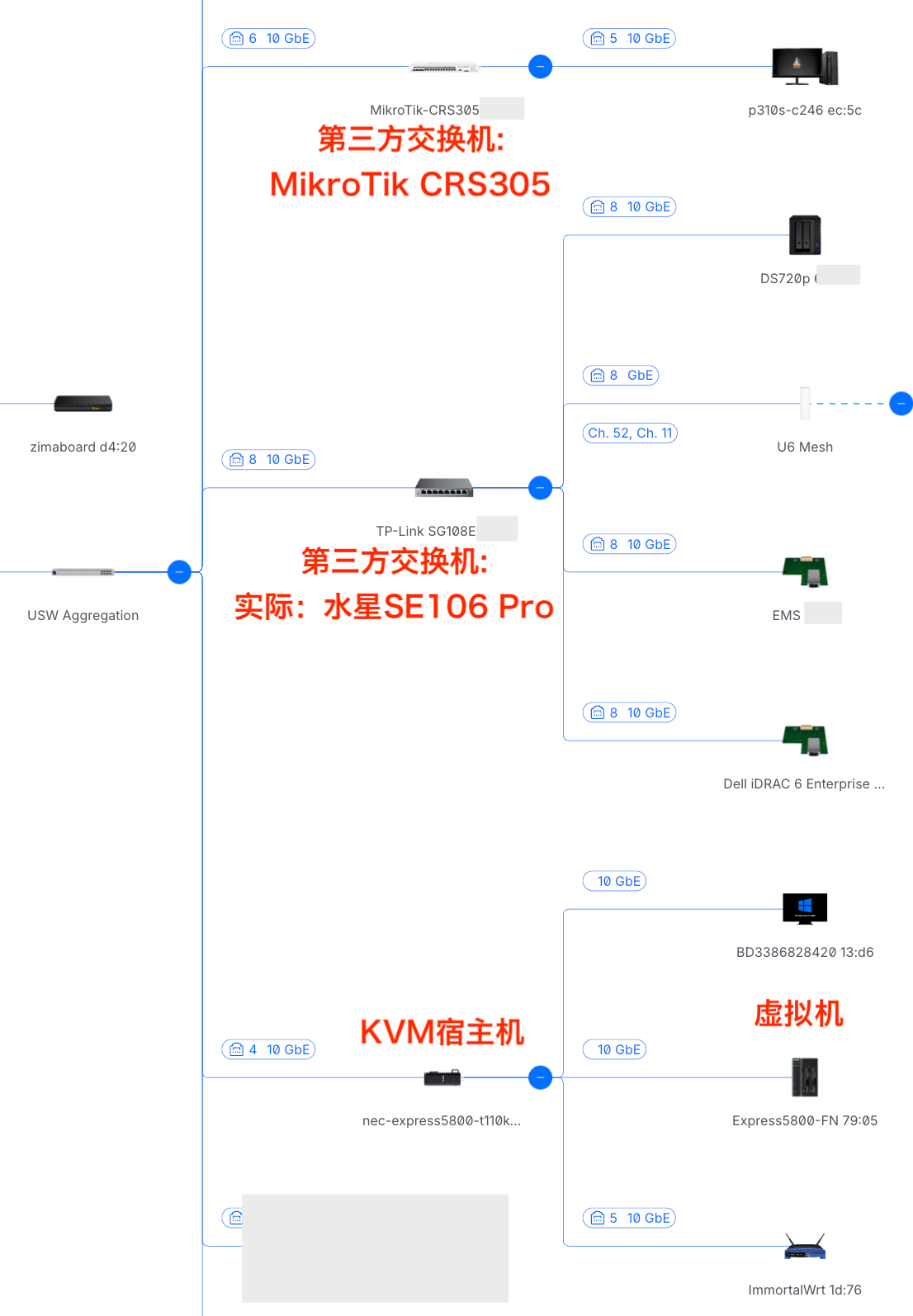
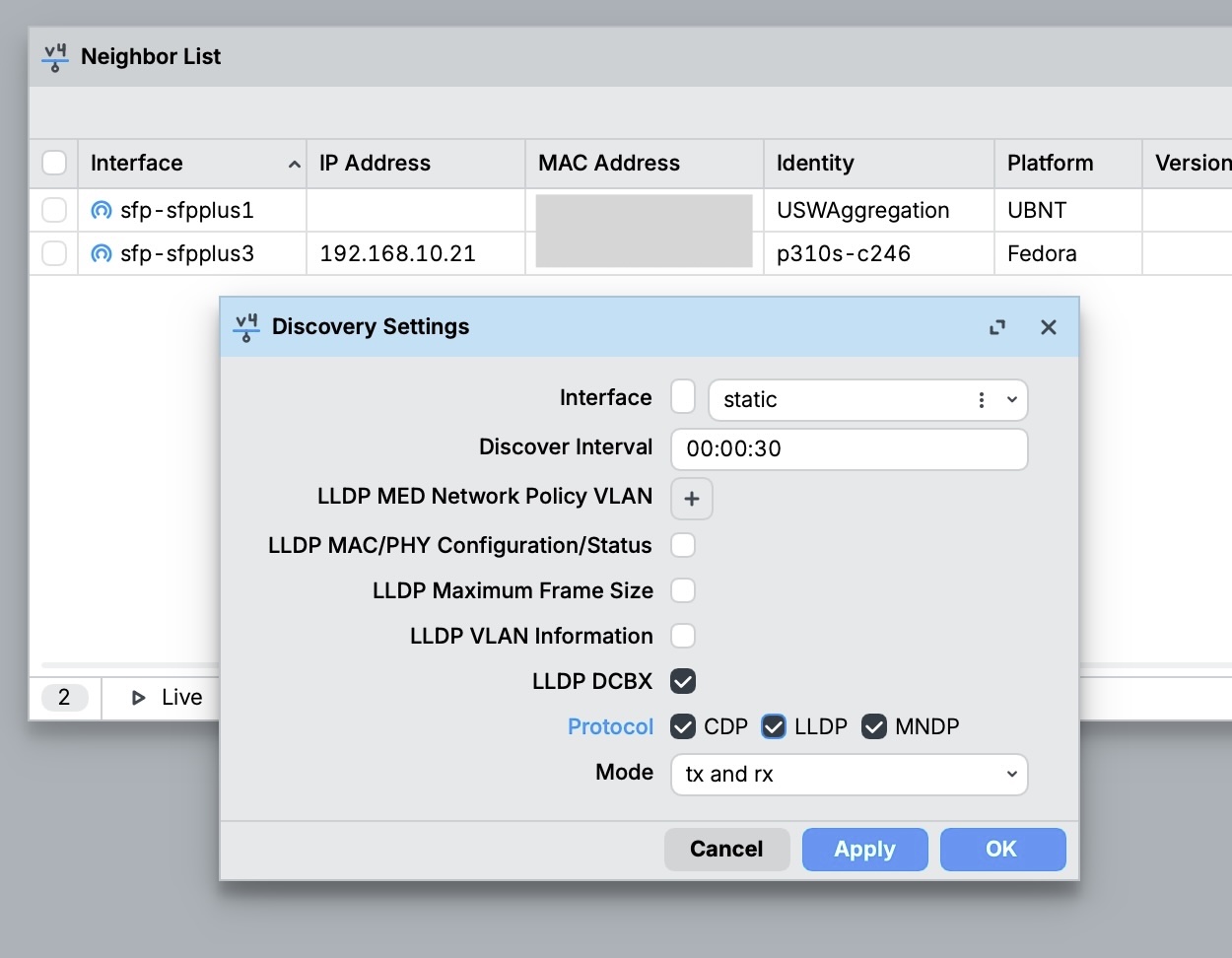
不过实际上UniFi对于第三方的设备并不是完全不支持,而是可以支持LLDP协议,有时是能把拓扑显示对的(甚至可以出显示宿主机下挂着它的虚拟机),但限制很多:
附加:有趣的是,通过安装lldpd软件,可以让linux宿主机到虚拟机的拓扑像一个交换机一样也显示出来,毕竟宿主机也有一个软件bridge来连通内部的虚拟机。
lldpd一般各大发行版的源里都自带,我是用的fedora server + libvirt虚拟机方案,装好并启用服务就能正确显示了:
sudo dnf install lldpd
sudo systemctl enable --now lldpd

# 验证:查看邻居
sudo lldpcli show neighbors2026-06-09 14:41:03
将站点从vultr JP迁移到了更快的VPS上,正在测试稳定性;
另外启用了新主题,仍在施工中,若您有发现任何问题或建议,欢迎评论反馈
(头图出处:https://naijiaer.lofter.com/post/1e036945_2bd4cd88c)
站点迁移后测试中最先出现在WuSiYu Blog。


